



State Return Corrections: How To Amend A State Tax Return
You filed your state tax return weeks ago and just realized you missed a deduction or entered the wrong income amount. Your stomach drops because you know the IRS already processed your return. The good news is you can fix these mistakes by learning how to amend a state tax return. Most states let you correct errors within three years of your original filing date, giving you time to claim refunds you deserve or pay additional taxes you owe.
The process requires you to gather specific state forms, recalculate your numbers, and submit corrected information to your state tax agency. Each state has its own amendment form and procedures, but the core steps remain similar whether you file in California, New York, Texas, or any other state. You can complete amendments through tax software like TurboTax or H&R Block, or file paper forms directly.
This guide walks you through ten clear steps to amend your state return correctly. You'll learn when amendments are necessary, which forms your state requires, how to coordinate with federal changes, and how to track your amended return status. We also cover special situations like multi-state filing, previous-year returns, and handling IRS notices that arrive after you submit corrections.
What amending a state return means
An amended state tax return is a corrected version of your original state income tax filing that you submit after discovering errors, omissions, or changes in your financial information. When you amend, you're officially notifying your state tax agency that the numbers on your initial return were incorrect and need updating. This process differs from simply filing a late return because you're revising a return the state already accepted and processed.

The legal definition of an amended state return
Your state considers an amendment a legal modification to your previously filed return that changes your tax liability, refund amount, or reported income. Most states require you to use a specific amendment form (like California's 540X or New York's IT-201-X) rather than simply submitting another copy of your original form. The amendment creates an official record showing both your originally reported figures and your corrected numbers side by side.
States process amendments separately from original returns, often taking longer to review because tax examiners manually verify the changes. You must clearly explain what you're changing and why in the designated sections of your state's amendment form. This documentation protects you if questions arise later about your tax history.
"An amended return officially corrects your tax record and may result in additional payments or refunds depending on the nature of your changes."
What triggers the need for an amendment
You need to amend when you discover mathematical errors on your filed return, such as incorrect addition of income sources or miscalculated deductions. Missing a W-2 form from a second job or forgetting to report freelance income on a 1099-NEC are common triggers that require amendments. Changes to your federal return also force state amendments because most states base their tax calculations on your federal adjusted gross income.
Life events that happened after filing can trigger amendments too. If you receive a corrected Form 1099 showing different investment income, you must amend your state return to match the accurate figures. Filing status changes (like switching from single to married filing jointly) also require amendments when you discover you qualified for a different status on your original return.
The difference between amendments and corrections
State tax agencies make automatic corrections for basic math errors without requiring you to file an amendment. If you simply added two numbers incorrectly but reported the right income amounts, your state will fix this and send you a notice explaining the change. You don't need to take action when your state makes these administrative adjustments.
Amendments involve substantive changes to your reported income, deductions, or credits that the state cannot fix automatically. When you need to add a dependent you forgot to claim or report additional income from a late-arriving 1099, you must file a formal amendment. Understanding how to amend a state tax return becomes critical when these substantive changes affect your tax liability by more than a few dollars or involve claiming refunds you missed.
The amendment process requires you to recalculate your entire return with the corrected information, not just submit a single correction. You'll complete sections showing your original figures, your new figures, and the net difference between them for each line item that changed.
When you should amend and when you should not
Not every mistake on your state tax return requires an amendment. You need to distinguish between errors that demand formal corrections and minor mistakes your state tax agency fixes automatically. Understanding when to amend saves you time and prevents unnecessary paperwork while ensuring you correctly handle situations that truly require your action.
Clear reasons to file an amendment
You must amend when you discover unreported income after filing your original return. If you receive a late W-2 from a job you forgot about or get a corrected 1099 showing different dividend amounts, your state return needs updating. Filing status errors also require amendments, especially when you claimed single but should have filed as head of household, which changes your standard deduction and tax brackets.
Missing or incorrect deductions and credits are strong reasons to file amendments. When you forgot to claim your mortgage interest deduction or failed to report a child born during the tax year, you're leaving money on the table. These situations directly affect your tax liability or refund amount, making amendments necessary to correct your record.
Changes to your federal return automatically trigger state amendment requirements in most cases. States base their calculations on your federal adjusted gross income, so when the IRS adjusts your federal return, you must update your state filing to match. You'll need to know how to amend a state tax return when the IRS sends you a notice showing different income or deduction amounts than you originally reported.
When the state handles corrections automatically
Your state tax agency fixes basic math errors without requiring amendments from you. If you incorrectly added your total income or subtracted deductions wrong, the state recalculates the correct amounts and sends you a notice. These administrative corrections happen during the normal processing period and don't need your intervention.
Transposed numbers in addresses or minor clerical mistakes get corrected automatically too. When you accidentally wrote $5,000 as $50,000 but your attached W-2 clearly shows $5,000, the state matches the documents and fixes the error. You receive a letter explaining the change, but you don't need to file an amendment unless you disagree with their correction.
Step 1. Check your state rules and deadlines
Your first step in learning how to amend a state tax return is identifying the specific amendment rules your state enforces. Each state sets its own deadline for filing amendments, typically ranging from three to four years from your original filing date or due date (whichever comes later). You risk losing potential refunds or facing penalties if you miss your state's cutoff date, making this research critical before you start the amendment process.

Find your state's amendment deadline
Most states follow the three-year rule that mirrors federal amendment deadlines, but several states extend this to four years or impose different calculation methods. California gives you four years from the original return's due date, while New York follows a three-year period from when you filed the original return. Your state's deadline determines whether you can still claim that missed refund or correct an error that would increase your tax liability.
You calculate your deadline by counting from the later of two dates: your original filing date or the official due date for that tax year. If you filed your 2024 state return on March 1, 2025, but the due date was April 15, 2025, your three-year clock starts on April 15, 2025. This means your amendment deadline falls on April 15, 2028 in most states.
"Missing your state's amendment deadline means permanently losing any refund you could have claimed, even if you discovered a significant error."
Locate your state's official amendment form
Each state requires you to use a designated amendment form rather than simply refiling your original state return with corrections. California residents use Form 540X, while New York requires Form IT-201-X. Your state's tax agency website lists the correct form number in its forms section, usually under a category labeled "Amended Returns" or "Corrections."
Download the most current year's version of your state's amendment form, even when amending a prior tax year. States update forms annually to reflect new laws and calculation methods. You'll complete this form by entering both your original figures and corrected amounts in designated columns, then calculating the net difference that shows whether you owe additional tax or qualify for a larger refund.
Step 2. Confirm if you must amend federal first
Your state tax return calculation depends heavily on your federal adjusted gross income (AGI), which means changes to your federal return often require you to update your state filing afterward. Before you learn how to amend a state tax return, you need to determine whether the error you discovered affects both your federal and state returns or only your state filing. This sequence matters because filing your state amendment before correcting your federal return can create processing delays and force you to file multiple state amendments.
When federal changes trigger state amendments
You must amend your federal return first when the error involves income reporting mistakes that appear on both your federal Form 1040 and your state return. If you forgot to report a W-2 or 1099 form, this income flows directly to your federal AGI, which your state uses as the starting point for calculating state taxes. Filing your federal Form 1040-X before your state amendment ensures your state return matches the corrected federal figures the IRS has on record.
Deduction errors also require federal amendments before state corrections when they affect your itemized deductions or adjustments to income. When you discover unreported student loan interest or forgotten IRA contributions, these items change your federal AGI and automatically impact your state tax calculation. You'll wait until the IRS processes your federal amendment, then file your state correction using the updated federal numbers as your base.
"Filing your federal amendment first prevents your state from rejecting your amended return due to mismatched federal income figures."
When you can skip federal amendments
Your state amendment stands alone when the error involves state-specific deductions or credits that don't appear on your federal return. California residents who forgot to claim the renters' credit or missed a state-only dependent exemption can file state amendments without touching their federal returns. These purely state items have no federal equivalent and don't affect your federal AGI.
Taxpayers who discover errors in state withholding amounts or state estimated tax payments can amend their state returns independently too. If your employer reported the wrong amount of state tax withheld but your federal withholding was correct, you only need to correct the state portion. This separation lets you claim refunds faster without waiting for federal processing delays.
Step 3. Collect your original return and new documents
Your amendment process requires you to have both your original state return and all new documents that triggered the correction in front of you before you start filling out forms. You cannot accurately complete an amended return without comparing your originally reported figures to the corrected amounts line by line. Gathering these materials first prevents you from making additional errors that would require filing yet another amendment later.
Your original state return and all schedules
Pull out the complete copy of your original state return, including all schedules and attachments you submitted with your initial filing. You need every page that shows your income, deductions, credits, and tax calculations because your state's amendment form requires you to enter these original numbers in designated columns. If you filed electronically and didn't save a PDF copy, log into your state tax agency's online portal or your tax software account to download your return.
Your original return must include any state-specific schedules you filed, such as California's Schedule CA or New York's IT-201 attachments. These schedules contain details about income modifications and itemized deductions that flow into your main return calculations. Missing schedules force you to recreate numbers from memory, which increases your risk of making new mistakes while trying to correct old ones.
New or corrected documents that show the changes
Collect all corrected or late-arriving tax documents that revealed the error in your original filing. When you receive a W-2C (corrected W-2) or an updated 1099 form, you'll compare these new figures against what you originally reported to calculate the exact changes needed. Keep both the original version and the corrected version of these forms to show why the amendment became necessary.
"Having both original and corrected documents side by side ensures you accurately calculate the net changes to your income, deductions, and tax liability."
Documentation supporting new deductions or credits you forgot to claim belongs in this collection too. If you're adding a dependent, gather their Social Security card and proof of relationship. When you're claiming mortgage interest you missed, pull your Form 1098 showing the interest paid. This organized approach to learning how to amend a state tax return prevents delays caused by missing information when you complete the amendment forms.
Step 4. Recalculate the correct numbers
You must work through your entire state tax return calculation using the corrected information, not just fix the single line item that triggered your amendment. Your state tax liability connects multiple numbers across different sections of your return, so changing your income affects your adjusted gross income, which then impacts your deduction amounts, credit eligibility, and final tax owed. This step-by-step recalculation ensures you catch all changes that ripple through your return from a single correction.
Start with your corrected income figures
Begin by recalculating your total income using all corrected and newly discovered income documents. If you received a late W-2 showing $8,500 in wages you didn't report, add this amount to your originally reported wage total. When you have a corrected 1099-MISC that shows $3,200 instead of the $2,800 you filed, you increase your self-employment income by $400. These adjustments create your new gross income figure that replaces the number on your original return.
Calculate your revised state adjustments to income next, as these items reduce your gross income before reaching adjusted gross income. States handle these adjustments differently than the IRS, so you need your state's specific instructions when recalculating deductions for items like educator expenses or student loan interest. Understanding how to amend a state tax return requires you to follow your state's current rules, even when amending prior years.
Adjust your deductions and credits
Recalculate your standard or itemized deductions based on your new income figures and any missed deduction items. Your state's standard deduction may phase out at higher income levels, so adding previously unreported income could reduce your allowable deduction amount. When you forgot to claim a deductible expense, add it to your itemized deduction total and compare the new total against your state's standard deduction to determine which option gives you the lower taxable income.
"Your state tax credits often depend on your income level, making it critical to recalculate credit eligibility after any income changes."
Work through each credit you claimed to verify you still qualify at your new income level. California's renters' credit phases out at specific income thresholds, while New York's child and dependent care credit reduces as your adjusted gross income increases. Subtract credits that you no longer qualify for or add credits you can now claim based on your corrected figures.
Step 5. Complete the right state amended forms
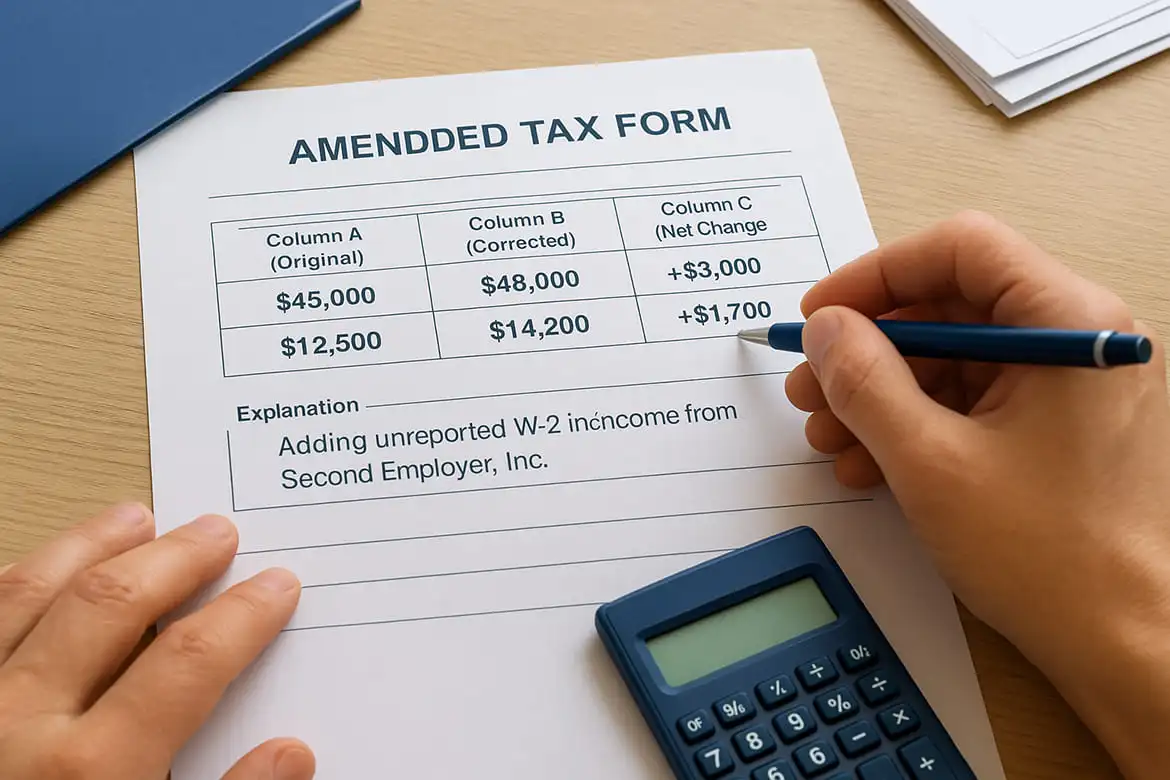
Your state's amendment form requires you to enter information in a specific three-column format that shows your original figures, corrected figures, and the net difference between them. You cannot simply mark through numbers on your original return or submit a fresh copy with new numbers. Most states design their amendment forms with labeled columns that guide you through reporting changes in a standardized way that matches their processing systems.
Locate your state's specific amendment form
Download the current version of your state's designated amendment form from your state tax agency's official website. California requires Form 540X for individual returns, New York uses IT-201-X, and Texas residents don't file state income tax amendments because Texas has no state income tax. Your state lists its amendment forms in the "Forms and Publications" section of its tax website, typically under categories labeled "Amended Returns" or "Corrections."
Check the form's tax year in the upper corner to ensure you're using the correct version for the year you're amending. States update their forms annually, so amending a 2023 return requires the 2023 version of your state's amendment form, not the current 2026 form. This detail matters because tax law changes affect calculations differently across years.
Fill out the three-column format
Complete each line of your amendment form by entering your original amount in Column A, your corrected amount in Column B, and calculating the net change in Column C. When you increase income from $45,000 to $48,000, you write $45,000 in Column A, $48,000 in Column B, and +$3,000 in Column C. This format lets tax examiners quickly identify what changed and verify your calculations.
| Column A (Original) | Column B (Corrected) | Column C (Net Change) |
|---|---|---|
| $45,000 | $48,000 | +$3,000 |
| $12,500 | $14,200 | +$1,700 |
Write a clear explanation in the designated box describing what you're changing and why. State "Adding unreported W-2 income from Second Employer, Inc." instead of vague statements like "correcting income." Understanding how to amend a state tax return includes providing specific reasons that help processors approve your amendment faster.
"Your explanation box creates the official record of why you filed the amendment, protecting you if questions arise later about your tax history."
Attach required supporting documents
Include copies of all new or corrected tax documents that support your changes, such as W-2Cs, revised 1099 forms, or receipts for deductions you forgot to claim. Staple these documents behind your completed amendment form in the order your state's instructions specify.
Step 6. Amend using TurboTax, H&R Block, or other software
Tax preparation software streamlines the amendment process by automatically transferring your original return data and calculating the differences between your old and corrected figures. You'll log into the same software you used to file your original return, which already stores your prior year's information and knows your state's specific amendment requirements. Software guides you through the correction process with interview-style questions that match how to amend a state tax return in your specific state.
Amend through TurboTax
Log into your TurboTax account and select "Amend a filed return" from your tax timeline or account dashboard. TurboTax pulls up your original return and asks which sections need corrections through a series of yes/no questions. When you answer yes to income changes, the software takes you directly to the income section where you add or correct W-2s, 1099s, or other forms.
Follow these steps in TurboTax:
- Click "Amend (change) return" next to the tax year you need to fix
- Select your reason for amending from the dropdown menu
- Navigate to the section with errors using the left-side menu
- Make your corrections by editing existing forms or adding new ones
- Review the summary page showing original vs. amended figures
- E-file your state amendment directly (available for most states)
"TurboTax automatically generates your state's amendment form and calculates all changes, eliminating manual math errors."
Amend through H&R Block
Access your H&R Block online account and click "Prior Years" followed by the year you need to amend. H&R Block displays your complete original return and asks "What would you like to change?" through checkboxes covering income, deductions, credits, and personal information. Selecting a checkbox opens the relevant section where you make corrections.
The software calculates your new refund or balance due instantly as you make changes. H&R Block supports e-filing amendments for participating states and automatically generates paper forms for states requiring mailed amendments. You can print the completed amendment with all required schedules attached in the correct order.
When software cannot handle your amendment
Your software may not support amendments for very old tax years beyond its three-year lookback period. Paper filing becomes necessary when amending returns from 2022 or earlier in 2026. Software also cannot process amendments involving complex state-specific situations like multiple state apportionments or consolidated business returns, requiring you to complete manual forms instead.
Step 7. File the amended return and handle payment or refund
Your completed amendment reaches your state tax agency through either electronic filing or mail, depending on your state's accepted methods and the software you use. You'll submit payment immediately if your corrected return shows you owe additional tax, or wait for processing if you're claiming a larger refund. This step finalizes the amendment process and starts the official review period that determines when you receive your refund or when your payment gets credited to your account.
Choose your filing method
E-file your state amendment if your state accepts electronic submissions for amended returns, which speeds up processing by two to four weeks compared to paper filing. Most states that accept e-filed amendments process them in eight to twelve weeks, while paper amendments take twelve to sixteen weeks. You select the e-file option directly in TurboTax, H&R Block, or your state's online portal after completing your amendment form. The system confirms your submission immediately and provides a confirmation number you should save for tracking purposes.
Mail your paper amendment when your state requires it or when you're amending tax years your software no longer supports. Address your envelope to your state's designated amendment processing center, which differs from the address used for original returns. Include all required attachments and schedules in the order your state specifies, and send the package via certified mail with return receipt requested to create proof of filing.
"Certified mail protects you by documenting exactly when your state received your amendment, which matters if you're filing near your deadline."
Handle payments or refunds correctly
Pay additional tax you owe immediately when filing your amendment to minimize interest charges that accrue daily on unpaid balances. You can submit payment electronically through your state's tax website, even when mailing paper amendments, by entering your Social Security number and the tax year being amended. States calculate interest from your original return's due date through your payment date, not from when you filed the amendment.
Wait for your refund check or direct deposit after the state processes amendments showing you overpaid. Understanding how to amend a state tax return includes knowing that refund timing varies by state and filing method, with most states issuing amended refunds within twelve weeks of acceptance.
Step 8. Track your amended state return status
Your state tax agency processes amendments separately from original returns, which means you need to use specific tracking tools designed for amended return lookups rather than the standard refund status checker. You'll monitor your amendment's progress through your state's online portal or by calling their dedicated phone line. Understanding how to amend a state tax return includes knowing where to find your amendment status and what each processing stage means for your refund timing or payment confirmation.

Check your state's online tracking system
Log into your state's tax website and locate the "Where's My Amended Return?" tool, which most states separate from their regular refund tracking systems. California taxpayers use the MyFTB portal to check amendment status, while New York residents access the "Check Refund Status" page and select the amended return option. You'll need your Social Security number, the exact refund or payment amount from your amended return, and the tax year you're tracking.
Enter this information exactly as it appears on your submitted amendment. Your state's system updates once weekly in most cases, so checking daily won't show new information. The system displays your amendment's current processing stage, estimated completion date if available, and whether the state needs additional documentation from you.
"Amended returns take significantly longer to process than original filings because tax examiners manually review every change you submitted."
Know what status updates mean
Your tracking system shows specific status messages that indicate where your amendment sits in the processing queue. "Received" means the state logged your amendment but hasn't started reviewing it. "In process" signals that an examiner is actively checking your calculations and supporting documents. "Completed" appears when the state finishes processing and either issues your refund or applies your payment to your account.
| Status Message | What It Means | Expected Timeline |
|---|---|---|
| Received | Amendment logged in system | 1-2 weeks after filing |
| In Process | Under examiner review | 8-12 weeks total |
| Completed | Refund issued or payment applied | 12-16 weeks total |
| Additional Information Needed | State requires documents | Processing paused until you respond |
Watch for "Additional Information Needed" status, which means you must submit requested documents before processing continues. Your state sends a separate letter explaining what they need and provides a deadline for your response.
Step 9. Handle notices, rejections, and audit risk
Your state tax agency sends notices when it finds discrepancies in your amended return or needs additional documentation to process your changes. You'll receive these notices by mail within four to eight weeks of filing your amendment, though some states send emails if you opted into electronic communications. Responding promptly to these requests prevents processing delays and reduces the chance your amendment gets rejected outright.
Respond to state notices requesting information
Open and read any state tax notice immediately because it contains a response deadline, usually 30 days from the notice date. The letter explains exactly what documentation the state needs, such as copies of W-2s, receipts for deductions you claimed, or clarification about income sources you reported. You gather these materials, write a brief cover letter referencing the notice number at the top of their correspondence, and mail everything to the address printed on the notice.
Fax or upload your response through your state's secure portal when the notice provides these options, which speeds up processing compared to mail. California taxpayers can respond through MyFTB, while New York residents use the Secure Messaging feature in their online account. Include your Social Security number, tax year, and notice number on every page you submit to prevent your documents from getting lost in processing.
Fix rejections and resubmit
Your amendment gets rejected when the state's system detects mathematical errors or missing required information before an examiner reviews it. The rejection notice lists specific problems, such as "Line 12 does not equal the sum of Lines 8 through 11" or "Schedule A missing." You correct these errors on a fresh copy of your amendment form, verify all calculations match, and refile the corrected version.
"Electronic rejections happen within 24 to 48 hours of filing, letting you fix problems and resubmit quickly before manual processing begins."
Resubmit through the same method you used initially, whether e-file or mail. Learning how to amend a state tax return includes understanding that resubmissions restart your processing timeline from the new filing date.
Manage audit risk after amendments
Amendments increase your audit likelihood slightly compared to original returns because you're drawing attention to potential errors in your tax history. States target amendments that significantly increase refunds or reduce income by large amounts, especially when the changes involve cash-based businesses or self-employment income. You reduce audit risk by attaching complete documentation supporting every change and providing detailed explanations in the amendment's reason box.
Step 10. Special situations that change the steps
Your amendment process becomes more complex when you face specific circumstances that don't fit the standard correction procedure. These special situations require you to follow modified filing procedures, use additional forms, or coordinate amendments across multiple tax agencies. Understanding how to amend a state tax return in these scenarios prevents you from submitting incomplete amendments that get rejected or delayed during processing.
Multi-state income and allocation changes
You need to amend returns in every state where you reported income when you discover errors affecting your multi-state allocation. If you worked remotely for a California company while living in Arizona, both states calculate taxes on portions of your income based on where you physically worked. Adding a forgotten W-2 from a third state requires you to recalculate your income split across all three states and file amendments showing the revised allocation percentages.
File your resident state amendment last after completing all non-resident state amendments because your resident state gives you credit for taxes paid to other states. California residents amending their return need to update Schedule S showing revised taxes paid to Arizona and any third state before finalizing their California 540X amendment.
Amending jointly filed or separately filed returns
Married couples who filed jointly must both sign the amended return even when only one spouse's income changed. Your state requires both signatures to authorize the correction and process any refund that belongs to both of you. When you discover that filing separately would have saved taxes, you cannot switch from a joint return to separate returns after the original filing deadline passes in most states.
"States prohibit changing from joint to separate filing status after the deadline because doing so would let couples manipulate their tax liability based on hindsight."
Prior year returns and lookback limits
Amending returns from three or more years ago hits special obstacles because your state's statute of limitations may have expired for claiming refunds. You can still file amendments to report additional income you owe tax on beyond the three-year window, but you cannot claim refunds for overpayments older than your state's cutoff date. Calculate your deadline from your original return due date, not your actual filing date, when determining if you can still claim missed refunds.
States require you to use the original year's forms when amending very old returns, which means you need to locate archived forms from your state's website under "Prior Year Forms."

Next steps
You now understand how to amend a state tax return from gathering documents through tracking your refund status. Your next action depends on your specific situation: file your federal Form 1040-X first if your changes affect federal income, then complete your state amendment using the corrected numbers. Download your state's current amendment form and work through the three-column format showing original amounts, corrected figures, and net differences.
Most taxpayers complete amendments successfully using tax software like TurboTax or H&R Block, which automatically transfers your original return data and calculates changes for you. Paper filing remains an option when software doesn't support your tax year or state-specific situation. Submit your completed amendment through e-file when available to cut processing time in half.
Professional help speeds up complex amendment situations involving multi-state returns, business income corrections, or IRS notices that triggered state changes. Get professional tax amendment assistance from licensed preparers who handle federal and state corrections, coordinate multi-state filings, and ensure your amendments maximize refunds while meeting all deadline requirements.