


10 Best Tax Filing Services for 1099 and Small Business Owners
If you earn 1099 income or run a small business, you already know tax season isn't as simple as plugging a W-2 into free software. Schedule C deductions, quarterly estimates, and self-employment tax add layers most filers never deal with. Picking the best tax filing service for your situation matters more than picking the cheapest one, because a bad match costs you missed deductions or a rejected return.
This list compares the platforms and services actually built for freelancers, independent contractors, and small business owners, not just generic filers. Whether you're comparing DIY software or looking for best tax filing service for 1099 workers who'd rather hand it off to a professional, you'll find options here for both approaches, plus what separates a solid choice from one that leaves money on the table.
We cover pricing, deduction support, audit protection, and how each option handles Schedule C and LLC filings, since that's where most self-employed people get tripped up. If you'd rather skip the software altogether, we'll also point out where a licensed tax preparer makes more sense than an app, especially once your return gets complicated with 1099s, business expenses, or multiple income streams.
1. TaxesToday.net: full-service tax prep for the self-employed
TaxesToday.net was built around a simple observation: self-employed filers need more than software, they need someone who actually reads their Schedule C and asks the right follow-up questions. The company is a licensed tax preparation service, not an app you fill out alone at midnight, and that distinction matters once your return includes 1099-NEC income, home office deductions, or mixed W-2 and freelance earnings. For anyone searching for the best tax filing service for 1099 work who wants a real person checking their numbers, this is the option built for exactly that.

How it works
You start by choosing virtual or in-person filing. Clients in Costa Mesa, Santa Ana, Fountain Valley, Irvine, and the broader Orange County area often come in person, while filers anywhere else in the country upload documents through a secure portal and connect with a preparer remotely. Either way, a CTEC-certified preparer handles the return, not a generic algorithm guessing at deduction categories. You send your 1099s, expense records, and prior-year return if you have one, and the preparer builds your Schedule C, calculates self-employment tax, and flags deductions you'd likely miss filing solo, things like mileage, home office percentage, and health insurance premiums for the self-employed.
A person who's done this hundreds of times catches deductions a algorithm never asks about.
Who it's for
This service fits freelancers, independent contractors, and single-member LLC owners who want their return prepared by someone with actual tax credentials, not just software support chat. It also covers non-resident and foreign student filers (F-1, J-1, OPT, CPT visa holders) who need Form 8843 or 1040NR support, a niche most consumer software handles poorly or not at all. If you've got back taxes to file, need an amended return corrected, or just want a second opinion on a return you already filed, TaxesToday.net handles those cases too. It's a weaker fit for someone with a single W-2 and no other complexity, since a free basic filer would cover that in ten minutes.
Pricing for 1099 and Schedule C filers
Pricing starts at $99 for straightforward individual returns, with Schedule C and self-employment filings priced based on complexity, typically landing higher once you factor in business expense categorization and multi-state filing needs. There's no hidden per-form upcharge structure like you'll hit with some DIY software once you add a state return or a second Schedule C.
| Service | Starting price |
|---|---|
| Individual/W-2 return | $99 |
| Self-employed/Schedule C | Quoted based on complexity |
| Amended return (1040-X) | Quoted based on complexity |
| Back tax filing | Quoted based on complexity |
| Non-resident (1040NR) | Quoted based on complexity |
You get an upfront quote before any work begins, so there's no surprise invoice at the end.
Pros and cons
Licensed, CTEC-certified preparers review every return instead of software flagging fields for you to fill in. Both virtual and in-person options mean you're not locked into one format, and the same team handles complex cases like non-resident filings and back taxes that most consumer apps simply won't touch.
- Pro: Real preparer reviews your Schedule C for missed deductions
- Pro: Handles amended returns, back taxes, and IRS notices, not just current-year filing
- Pro: Nationwide remote service with strong in-person presence in Orange County
- Con: Not a self-serve option if you prefer doing your own data entry
- Con: Pricing for complex returns requires a quote rather than a flat published rate
Overall, it's the strongest pick on this list if you want a licensed professional handling your self-employment taxes instead of software making decisions for you.
2. TurboTax Self-Employed
TurboTax Self-Employed is the DIY software most freelancers try first, mostly because the brand is everywhere. It's built for people comfortable answering interview-style questions and letting the software translate those answers into IRS forms, without a preparer looking over their shoulder. If you're comparing best tax software for schedule c work, this is the benchmark every other DIY product gets measured against, for better or worse.
How it works
Software walks you through a guided interview, asking about your 1099-NEC income, business expenses, and home office use, then auto-populates your Schedule C behind the scenes. You can import 1099s directly from many payment platforms, and the mileage tracking feature (through the QuickBooks Self-Employed integration) syncs if you already use that app. Live help is available through TurboTax Live, where a credentialed tax expert reviews your return or does it for you, at a significantly higher price point than the base self-employed tier.
Who it's for
Freelancers and independent contractors who've filed a Schedule C before and just need software to organize the numbers tend to do fine here. It also suits gig workers with straightforward income, one or two 1099s, and expenses that fall into standard categories like supplies, mileage, and a home office deduction. It's a weaker fit if you have multi-state income, a more complex LLC structure, or you simply don't trust yourself to catch software prompts you might skip past.
Software only finds deductions it knows to ask about, a preparer finds the ones you didn't know existed.
Pricing for 1099 and Schedule C filers
| Tier | Approximate price |
|---|---|
| Self-Employed (DIY) | $130-$150 federal, plus state |
| Live Assisted | $200+ federal, plus state |
| Live Full Service | $300+ federal, plus state |
Prices climb quickly once you add state filing and any live-help tier, and multiple Schedule C businesses can push costs higher still.
Pros and cons
TurboTax's interface is polished and its import tools save real time if your accounts are already connected. Live help closes some of the gap with a human preparer, but at a cost that often rivals hiring one outright.
- Pro: Strong import tools for 1099s and expense tracking
- Pro: Live expert review available if you want a second set of eyes
- Con: Live tiers get expensive fast for self-employed filers
- Con: No real preparer relationship unless you pay for the top tier
3. H&R Block Self-Employed
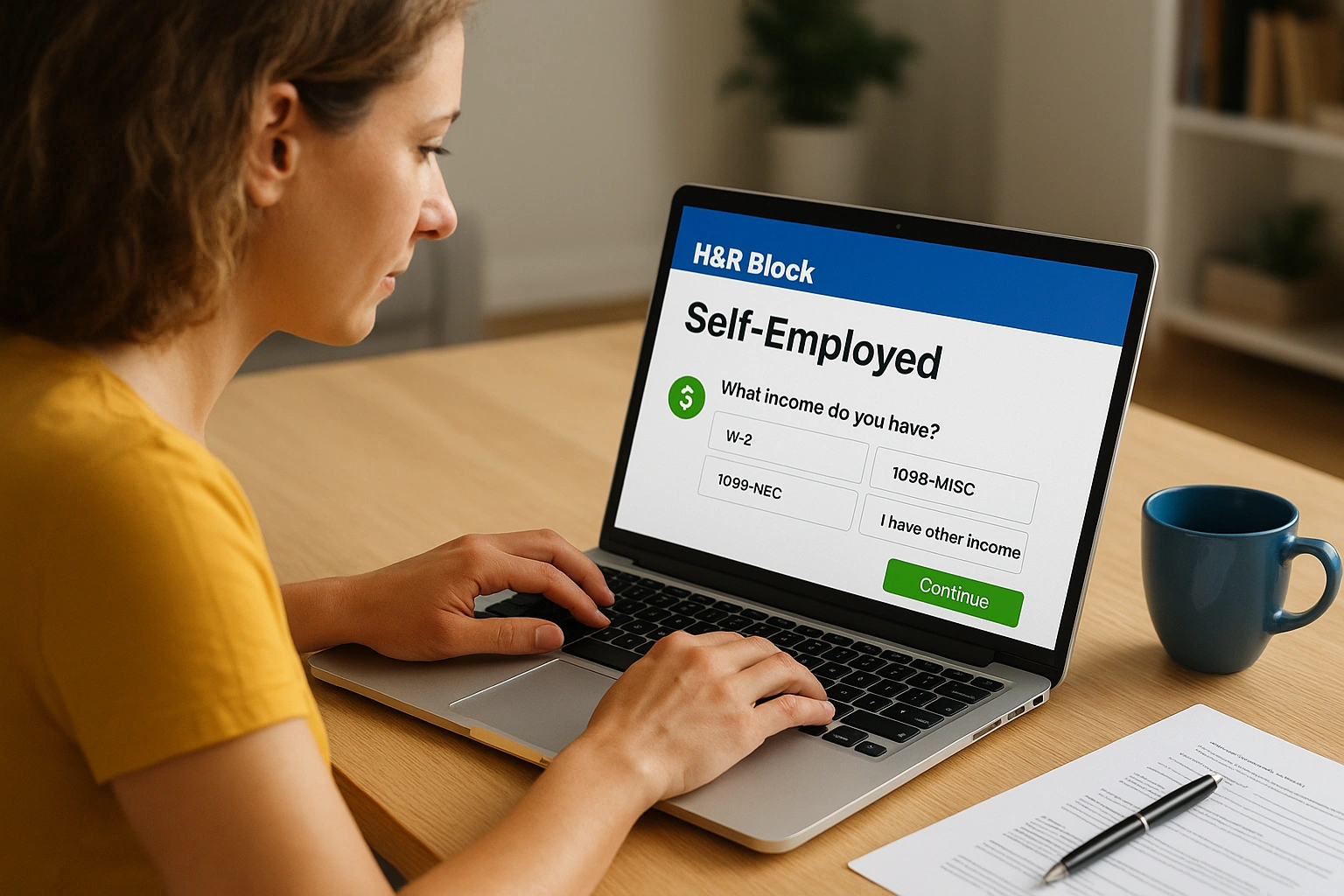
H&R Block Self-Employed splits the difference between pure DIY software and a preparer relationship, since you can start online and switch to in-person help at a physical branch if your return gets complicated. That hybrid model appeals to freelancers who want software pricing most of the time but like knowing a tax professional is available nearby if something doesn't add up. For anyone comparing best online income tax filing service options who still wants a brick-and-mortar backup, this is one of the few that offers both.
How it works
Online, the software runs an interview process similar to competitors, asking about your 1099 income, business expenses, and deductions, then building your Schedule C automatically. Where H&R Block stands apart is the option to add Tax Pro Review, where a credentialed preparer checks your completed return before you file, or to walk into one of the company's thousands of retail locations and hand the whole thing to a preparer in person. You can also import prior-year returns from other software, which saves time if you're switching providers mid-relationship.
Who it's for
Freelancers who like DIY pricing but want a safety net fit this service well, especially if you live near a branch and want the option to walk in with questions. It also suits small business owners filing a Schedule C who've used H&R Block before and trust the interface, since returning users move through the interview faster than first-timers. It's a weaker match if you need a dedicated preparer relationship from the start, since the online tier defaults to self-service unless you pay extra for review.
Software with a walk-in backup still isn't the same as a preparer who owns your return from the start.
Pricing for 1099 and Schedule C filers
| Tier | Approximate price |
|---|---|
| Self-Employed (DIY) | $115-$130 federal, plus state |
| Online Assist | $180+ federal, plus state |
| In-person filing | Varies by branch and complexity |
State returns add roughly $45 on top of any federal tier, and in-person pricing depends heavily on how complex your Schedule C turns out to be.
Pros and cons
Branch access sets H&R Block apart from most software-only competitors, and the import tools make switching from another provider painless.
- Pro: In-person branches available if online filing gets confusing
- Pro: Tax Pro Review adds a credentialed second look without full handoff
- Con: Base self-employed tier still leaves deduction-hunting to you
- Con: In-person pricing isn't published upfront, so costs can surprise you
4. TaxAct Self-Employed
TaxAct Self-Employed markets itself as the budget alternative to TurboTax and H&R Block, and for straightforward Schedule C filers, it mostly delivers on that promise. The interface looks a generation behind its bigger competitors, but the underlying tax engine handles self-employment income and business deductions competently, which is really what matters if you're filing on your own. Anyone comparing best online tax filing service for small business owners on a tight budget should put this one on the shortlist before paying more for a flashier interview screen.
How it works
Questions run through a standard interview format, asking about your 1099-NEC and 1099-K income, business expenses, and home office use before generating your Schedule C. TaxAct includes a deduction maximizer tool that compares your entries against common categories for your industry, flagging expenses you might have forgotten to enter. Accuracy guarantees back the calculations, and the software lets you import a prior-year return from TurboTax or H&R Block if you're switching providers, which saves re-entering basic information like your business code and depreciation schedules.
Who it's for
Freelancers and independent contractors comfortable with a slightly clunkier interface in exchange for a lower price tend to be happy here. It also suits small business owners running a simple single-member LLC with one revenue stream and standard expense categories, since the software doesn't struggle with basic Schedule C math. It's a weaker fit if you want live help from a credentialed preparer built into the base price, since TaxAct's support leans more toward technical chat than tax advice.
A lower price only helps if the software still catches the deductions you'd otherwise miss.
Pricing for 1099 and Schedule C filers
| Tier | Approximate price |
|---|---|
| Self-Employed (DIY) | $95-$110 federal, plus state |
| Xpert Assist | $50-$60 add-on for live CPA help |
| State return | $45-$55 each |
The Xpert Assist add-on gets you a CPA or enrolled agent on the phone, but only for questions, not a full review of your finished return.
Pros and cons
TaxAct undercuts the bigger brands on price without cutting corners on the actual tax calculations, which makes it a solid pick if you know your Schedule C well enough to self-navigate.
- Pro: Lower cost than TurboTax or H&R Block for comparable Schedule C support
- Pro: Accuracy guarantee backs the math if something goes wrong
- Con: Interface feels dated compared to competitors
- Con: Xpert Assist answers questions but doesn't review your full return
5. TaxSlayer Self-Employed
TaxSlayer Self-Employed built its reputation on aggressive pricing, undercutting the bigger names while still covering the forms a freelancer actually needs. It won't win any design awards, but the software gets your 1099-NEC income and Schedule C expenses filed correctly without charging premium rates for the privilege. If you're weighing the best tax software for schedule c work against a tight budget, TaxSlayer routinely lands as one of the cheapest options that still handles self-employment tax correctly.
How it works
You work through a guided interview that asks about your freelance income, business expenses, and any estimated tax payments you made during the year. TaxSlayer includes access to Ask a Tax Pro, a feature that connects you with a tax professional over phone, email, or chat if you get stuck on a specific question, though this isn't a full review of your finished return. The software also calculates quarterly estimated tax vouchers for the following year, which helps if you underpaid in the current one and want to avoid a penalty next April.
Who it's for
Freelancers who've filed a Schedule C before and mainly want a low-cost way to repeat the process tend to do well here. It also suits gig workers with a single 1099 stream and simple expenses like a home office deduction or mileage, since the interview doesn't get bogged down with prompts you don't need. It's a weaker fit if you want a preparer to actually check your business expense categorization, since Ask a Tax Pro answers questions rather than reviewing your entries line by line.
A cheap price only pays off if you already know your Schedule C well enough to fill it in yourself.
Pricing for 1099 and Schedule C filers
| Tier | Approximate price |
|---|---|
| Self-Employed (DIY) | $63-$70 federal, plus state |
| State return | $40-$45 each |
| Ask a Tax Pro | Included with Self-Employed tier |
That included tax-pro access is one of the better values on this list, since competitors often charge extra for any live support at all.
Pros and cons
TaxSlayer's biggest advantage is price paired with included professional access, a combination few competitors match at this tier.
- Pro: Among the cheapest self-employed tiers that still covers Schedule C fully
- Pro: Ask a Tax Pro is included, not an upsell
- Con: Interface feels basic compared to TurboTax or H&R Block
- Con: No full return review, only question-based support
6. FreeTaxUSA
FreeTaxUSA flips the usual pricing model on its head: federal filing is free for nearly every situation, including Schedule C, and you only pay for the state return. That structure makes it one of the few genuinely best online tax filing service picks for freelancers who've priced out the bigger brands and balked at paying $130 just to report 1099 income. The tradeoff is a bare-bones interface with none of the hand-holding you'd get from a premium product, so you need to already understand what you're entering.
How it works
Questions run through a no-frills interview that covers your 1099-NEC and 1099-K income, business expenses, and home office deduction, then builds your Schedule C without much explanation along the way. FreeTaxUSA supports Deluxe support, a $7-$8 add-on that gets you live chat with a support agent and priority handling if the IRS ever questions your return. There's no import tool for prior-year returns from other software, so you'll retype your business code, depreciation schedule, and carryover figures by hand if you're switching providers.
Who it's for
Freelancers who've filed a Schedule C for a few years and know their deduction categories cold tend to save the most money here. It also suits independent contractors with simple, single-stream 1099 income who don't need software prompting them toward deductions they might have missed. It's a weaker fit for a first-time self-employed filer who benefits from more guided prompts, since the plain interface won't catch mistakes born from inexperience.
Free federal filing only saves you money if you already know your Schedule C well enough to fill it in correctly.
Pricing for 1099 and Schedule C filers
| Item | Price |
|---|---|
| Federal return (including Schedule C) | Free |
| State return | $14.99 |
| Deluxe support add-on | $7.99 |
That pricing structure beats every other paid competitor on this list for a basic self-employed return.
Pros and cons
Getting a fully free federal Schedule C filing is rare, and the low state fee keeps total cost under $25 for most filers.
- Pro: Free federal filing even with self-employment income
- Pro: Cheapest total cost for filers who know their own numbers
- Con: No deduction-maximizer prompts or guided coaching
- Con: No import tool for switching from another provider
7. Cash App Taxes
Cash App Taxes is the only fully free filing option on this list that covers both federal and state returns at no cost, including Schedule C. It grew out of Credit Karma Tax after Cash App acquired and rebuilt it, and the pitch is simple: no upsells, no tiered pricing, no surprise add-on fees for self-employment forms. For anyone comparing best online tax filing 1099 options purely on cost, this one is hard to beat on paper, though the tradeoff shows up in support and form coverage.

How it works
You need the Cash App mobile app installed to start, since that's how the platform verifies your identity before handing you off to the desktop filing interface. Once you're in, a guided interview asks about your 1099-NEC income, business expenses, and home office use, then builds your Schedule C without much extra explanation along the way. There's no live chat or phone support built into the product, so if a prompt confuses you, you're mostly on your own or searching the help center for an answer.
Who it's for
Freelancers with a single, straightforward 1099 stream and standard expense categories tend to do fine here, especially if they've filed a Schedule C before and don't need coaching. It also suits independent contractors who specifically want to avoid the free-then-charge pattern common with bigger brands, since Cash App Taxes doesn't unlock a paywall partway through. It's a weak fit if you have multiple state returns, a more complex LLC structure, or you want any live human support if a question comes up mid-return.
Free only helps if the software actually supports your specific tax situation without hitting a wall halfway through.
Pricing for 1099 and Schedule C filers
| Item | Price |
|---|---|
| Federal return (including Schedule C) | Free |
| State return | Free |
| Live support | Not available |
That's the entire pricing structure. There's no premium tier to upgrade into, which is refreshingly simple compared to competitors that gate self-employment forms behind paid tiers.
Pros and cons
Zero cost for both federal and state filing is a genuine rarity, and the app doesn't nickel-and-dime you once you're partway through entering your business income.
- Pro: Completely free for federal and state, even with Schedule C
- Pro: No upsells or paywalls once you start your return
- Con: No live chat, phone, or in-person support if you get stuck
- Con: Doesn't support every state or every tax situation, so check compatibility first
8. Jackson Hewitt
Jackson Hewitt built its brand on walk-in tax prep at thousands of kiosks inside Walmart stores, plus an online filing option that's grown more capable in recent years. The company leans heavily on convenience, you can drop off documents at a strip-mall location on a Saturday and pick up a finished return by Monday, which appeals to freelancers who'd rather hand off the paperwork than learn Schedule C rules themselves. For anyone comparing best tax filing for 1099 work who values a physical location over an app, Jackson Hewitt is one of the few national chains still built around that model.

How it works
Online, the software runs a standard interview asking about your 1099-NEC income, business expenses, and estimated tax payments, then builds your Schedule C automatically. In person, you sit with a preparer who enters your information directly, asks follow-up questions about your business, and hands you a completed return before you leave. Jackson Hewitt also offers a flat-fee guarantee at many locations, meaning the price is quoted upfront regardless of how many forms your return needs, which removes the per-form pricing anxiety common with software.
A flat quoted price beats guessing what your final invoice will look like after every form gets added.
Who it's for
Freelancers who want in-person help but don't need year-round CPA access tend to do well here, especially if a location sits near where they already shop. It also suits small business owners filing a simple Schedule C who want a human double-checking entries without paying full accounting-firm rates. It's a weaker fit for complex multi-state or multi-entity returns, since kiosk staff turnover means you're not guaranteed the same preparer next year.
Pricing for 1099 and Schedule C filers
| Tier | Approximate price |
|---|---|
| Online Self-Employed | $75-$115 federal, plus state |
| In-person filing | Flat fee, varies by location |
| State return (online) | $40-$45 |
In-person pricing depends on the franchise location, so ask for a quote before handing over documents.
Pros and cons
Walk-in access nationwide sets Jackson Hewitt apart from software-only competitors, and flat-fee pricing at many locations avoids surprise upcharges.
- Pro: Widespread physical locations, often inside Walmart
- Pro: Flat-fee pricing available at many branches
- Con: Preparer quality varies by location and season
- Con: Online tier lacks the deduction-coaching some competitors include
9. IRS Free File program
The IRS Free File program is a partnership between the IRS and a handful of approved software providers that lets eligible filers prepare and submit both federal and, in most cases, state returns at no cost. It's not a single piece of software, it's a portal on IRS.gov that routes you to one of several participating companies based on your income and filing needs. Anyone comparing the best tax filing service options purely on price should know this program exists before paying for a commercial product that does the same job.
How it works
You start at IRS.gov and answer a short eligibility questionnaire covering your adjusted gross income, age, and state of residence. If you qualify, the tool matches you to a partner provider, several of which support Schedule C and self-employment income, though coverage varies year to year as providers rotate in and out of the program. Once matched, you file through that provider's own interface, which functions much like any other DIY software, just without a paywall for federal filing.
Free File only helps freelancers whose income falls under the eligibility cap and whose Schedule C is straightforward enough for a no-frills interface.
Who it's for
Freelancers and independent contractors under the income threshold, roughly $84,000 in adjusted gross income for the 2025 filing season, get the most value here, especially if their Schedule C involves a single income stream and standard deductions. It also suits self-employed filers comfortable navigating a government portal instead of a polished commercial brand. It's a poor fit above the income cap, since you'll get bounced to a paid product, or if your business has multiple entities and complex depreciation schedules.
Pricing for 1099 and Schedule C filers
| Item | Price |
|---|---|
| Federal return (including Schedule C) | Free, if eligible |
| State return | Free through some partners, paid through others |
| Income eligibility cap | Roughly $84,000 AGI for 2025 |
Pros and cons
Zero-cost federal filing from a government-vetted program is a real advantage for income-eligible freelancers.
- Pro: Genuinely free federal filing with no upsell attempts
- Pro: Backed directly by the IRS, so trust isn't a concern
- Con: Income cap excludes many established small business owners
- Con: Provider options and state coverage change annually, so recheck eligibility each year
10. Hiring a local CPA or enrolled agent
Sometimes software just isn't the right tool, no matter how good the interview design gets. A certified public accountant or enrolled agent brings credentials the IRS recognizes for representation, meaning they can speak to the agency on your behalf if a notice ever shows up. This option costs more than any software on this list, but for a self-employed filer with real complexity, the extra cost often pays for itself in deductions found and mistakes avoided.
How it works
You meet with the CPA or EA directly, either in person or over video, and hand over your 1099s, expense records, mileage logs, and any prior-year returns. They ask questions software never thinks to ask, things like whether you switched business structures mid-year or paid a spouse for work. From there, they prepare your Schedule C, calculate self-employment tax, and often build a quarterly estimated tax plan for the following year so you're not scrambling next April.
A credentialed preparer can represent you in front of the IRS, something no software product ever offers.
Who it's for
This route suits small business owners running an LLC or S-Corp with payroll, multiple revenue streams, or significant depreciation schedules. It also fits freelancers who got an IRS notice last year and want someone who can respond on their behalf, not just a support chat window. Someone with a single 1099 and simple expenses, on the other hand, will overpay for expertise they don't need yet.
Pricing for 1099 and Schedule C filers
| Complexity | Typical price range |
|---|---|
| Simple Schedule C | $250-$400 |
| Schedule C with multiple income streams | $400-$800 |
| S-Corp or multi-entity return | $800-$1,500+ |
Rates vary widely by region and by how organized your records are when you arrive, so ask for an estimate before committing.
Pros and cons
Experience matters here more than anywhere else on this list, since a seasoned CPA has already seen the audit triggers and deduction gray areas that trip up software users. That expertise carries a price tag, though, and not every freelancer needs it every year.
- Pro: IRS representation rights if a notice or audit comes up
- Pro: Best fit for complex LLC, S-Corp, or multi-stream income
- Con: Highest cost of any option on this list
- Con: Availability and pricing vary a lot by location and season
Picking the right fit for your tax situation
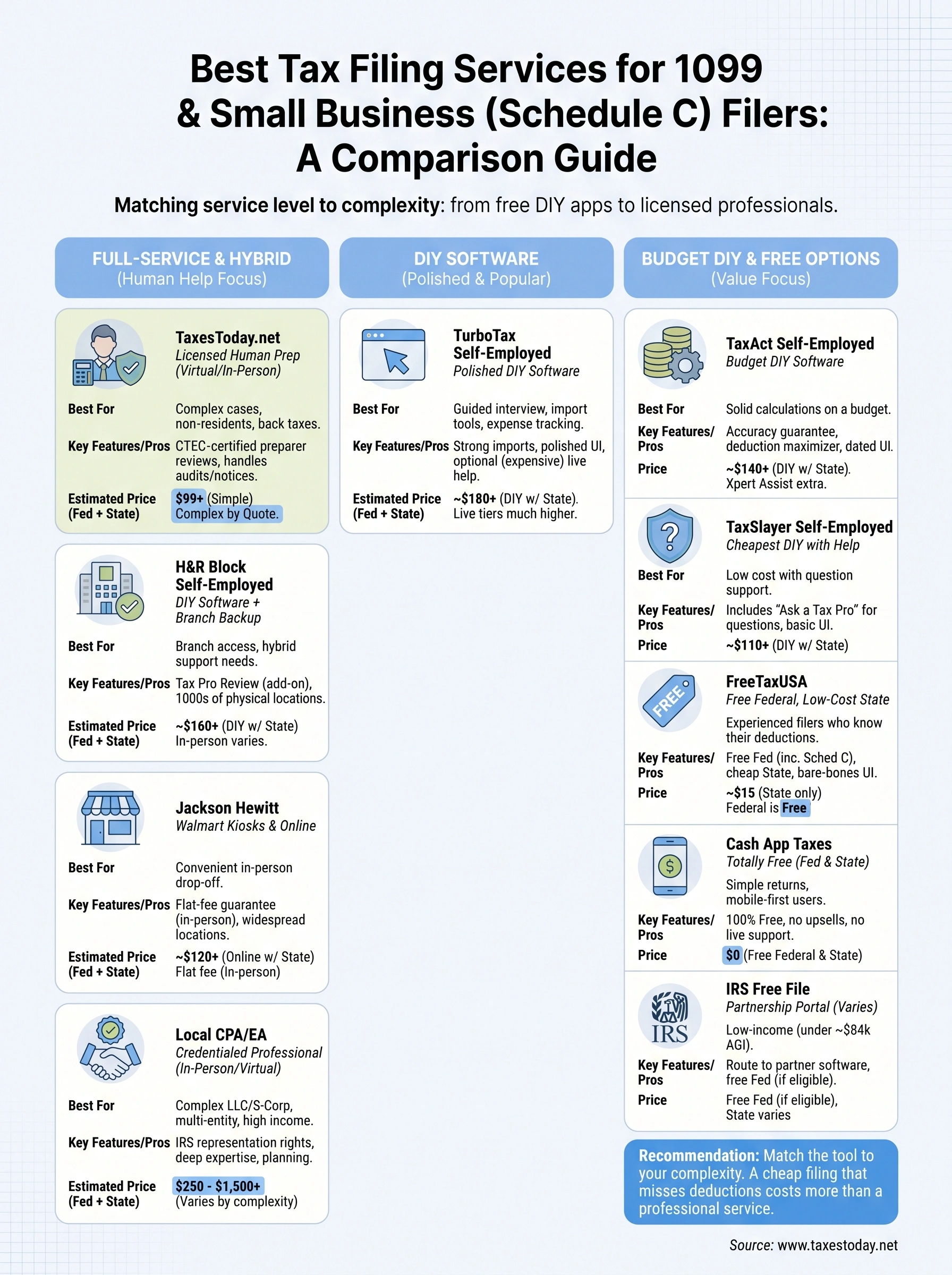
Software works fine if your Schedule C is simple and you already know your deduction categories cold. FreeTaxUSA or Cash App Taxes will save you money in that case, and there's no shame in using them. But once your return involves multiple income streams, a home office calculation you're not confident about, or an IRS notice sitting in your mailbox, an algorithm stops being enough. That's the gap a licensed preparer fills, someone who asks the follow-up questions software never thinks to ask and catches deductions before you file, not after an amended return becomes necessary.
Match the tool to your complexity, not your budget alone. A cheap filing that misses a home office deduction or miscalculates self-employment tax costs more than the software saved. If you'd rather have a CTEC-certified preparer handle your 1099 income directly, get started with TaxesToday.net and file with someone who actually reads your return.