


File LLC Taxes Online: Forms, Deadlines, And Best Options
If you own an LLC, tax season comes with a specific set of questions: Which forms do you actually need? What's your filing deadline? And can you file LLC taxes online without making a costly mistake? The answers depend on how your LLC is structured, and most owners don't realize that the IRS doesn't treat all LLCs the same way.
A single-member LLC files differently than a multi-member LLC, and both file differently from an LLC that's elected S-Corp status. Each structure has its own required forms, deadlines, and rules that directly affect what you owe. Miss a deadline or use the wrong form, and you could face penalties that eat into your bottom line, even if you don't owe any tax.
The good news: filing online is straightforward once you know exactly what applies to your situation. This guide breaks down the forms your LLC needs, the deadlines you can't afford to miss, and the best options for getting your return filed accurately. We'll cover every common LLC tax scenario so you can move forward with confidence instead of guesswork.
At TaxesToday, we prepare and file LLC tax returns for single-member LLCs, multi-member LLCs, and S-Corp elections, both virtually and in person. With over 15 years of experience and CTEC-certified, IRS-registered preparers on the team, we handle the complexity so you don't have to. Whether you file on your own or work with us, this guide gives you the knowledge to get it right.
How LLC taxes work online in plain English
The IRS treats LLCs as pass-through entities by default, which means the business itself doesn't pay federal income tax directly. Instead, profits and losses flow through to the owners' personal tax returns. Understanding this foundation changes how you approach everything when you want to file LLC taxes online, because the forms you use and the deadlines you follow depend entirely on how the IRS classifies your specific LLC.
The IRS doesn't tax your LLC as a standalone business by default
When you form an LLC, the IRS assigns it a default tax classification based on how many members it has. A single-member LLC is treated as a "disregarded entity," meaning the IRS ignores the LLC as a separate taxpayer and taxes you directly as a sole proprietor on Schedule C. A multi-member LLC gets treated as a partnership by default. In both cases, the LLC itself doesn't pay income tax; the liability lands on the individual owners.
The classification your LLC holds determines which forms you file, which deadlines apply, and how many returns you submit each year.
You also have the option to change this default. If your LLC files Form 8832, it can elect to be taxed as a C-Corporation. If it files Form 2553, it can elect S-Corporation status. These elections change your filing requirements substantially, so confirming your current classification before starting any return is the right first move.
The four ways the IRS can classify your LLC
Your LLC's tax treatment falls into one of four categories, and each one points to a different federal form:
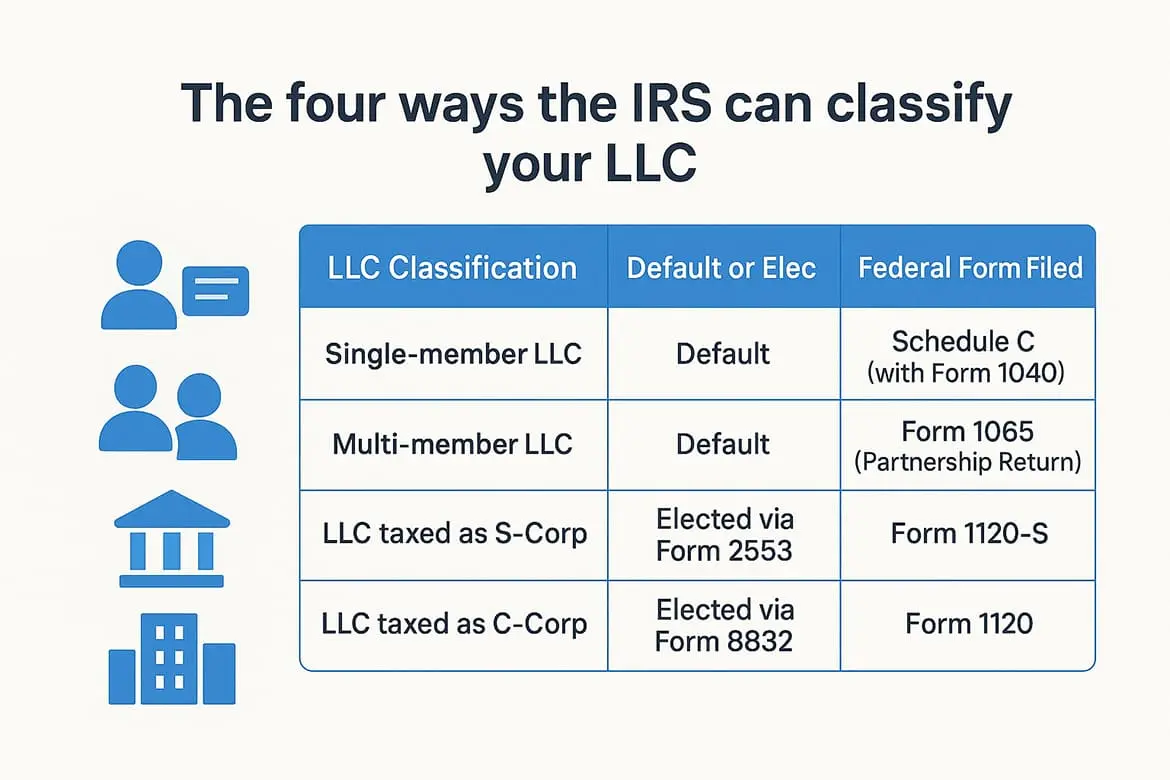
| LLC Classification | Default or Elected | Federal Form Filed |
|---|---|---|
| Single-member LLC | Default | Schedule C (with Form 1040) |
| Multi-member LLC | Default | Form 1065 (Partnership Return) |
| LLC taxed as S-Corp | Elected via Form 2553 | Form 1120-S |
| LLC taxed as C-Corp | Elected via Form 8832 | Form 1120 |
Each classification carries its own filing deadline and payment schedule. If you're not sure which category applies to you, check the IRS letter you received when you applied for your Employer Identification Number (EIN), which typically confirms your entity type. You can also review your Entity Classification Election records directly through the IRS.
What filing online actually means for your LLC
Filing online means you submit your federal and state tax forms electronically through IRS e-file or an approved software platform, rather than mailing paper returns. The IRS strongly encourages e-filing because it reduces processing errors and speeds up confirmation. For LLCs, e-filing is available for Form 1040 with Schedule C, Form 1065, Form 1120-S, and Form 1120.
The process works in three stages: you prepare the return using software or a professional service, the platform runs validation checks before submission, and then the return gets transmitted directly to the IRS. Within 24 to 48 hours, you receive an acknowledgment confirming the IRS accepted or rejected your return. State e-filing usually follows the same process through your state's own system or a combined federal-state submission.
One detail that catches many LLC owners off guard is self-employment tax. This applies to most single-member LLC owners and general partners in multi-member LLCs, covering Social Security and Medicare contributions. It gets calculated on Schedule SE and is completely separate from your income tax. Missing it, or failing to pay estimated taxes quarterly, can result in a penalty even when your annual return shows no income tax due.
Before you file: what to gather and set up
Before you attempt to file LLC taxes online, disorganized records are the primary reason returns get delayed or submitted with errors. Gathering everything upfront saves you from stopping mid-return to hunt down a missing bank statement or a 1099. Set aside one to two hours before you open any software or service platform, and pull all your materials together in one place.
Documents and records to collect
Your return will only be as accurate as the records you bring to it. Income documentation is your starting point, and it varies depending on how your LLC earns money. If clients or platforms paid you more than $600, they should have sent you a Form 1099-NEC or 1099-K. If your LLC invoiced directly, pull your own records and reconcile them against your bank deposits.
Missing even one 1099 can trigger an IRS notice, so cross-check every income source against your bank statements before you start.
Here is a checklist of what to gather:
- Income records: 1099-NEC, 1099-K, sales invoices, payment processor statements
- Expense records: Receipts, bank statements, credit card statements, mileage logs
- Payroll documents: W-2s and payroll summaries if you have employees or took an S-Corp salary
- Prior year return: Your last filed return for reference and carryover amounts
- EIN confirmation: Your IRS EIN letter confirming your entity classification
- Estimated tax payment records: Any quarterly payments made using Form 1040-ES or EFTPS
Accounts to set up before you start
Two online accounts will make your filing process significantly smoother. First, create or log into your IRS Online Account at irs.gov, where you can verify your payment history, check outstanding balances, and confirm prior-year records. Second, create an account with your state's tax agency portal so you can e-file your state return directly once the federal return is complete.
Accounting platforms can also speed things up considerably. If you use one, export a profit and loss statement for the tax year before you begin. This single document gives you a clean summary of revenue, cost of goods sold, and deductible business expenses that maps directly onto the federal forms you will be completing. Having it ready before you start cuts your preparation time significantly and reduces the chance of overlooking a deductible item.
Step 1. Confirm your LLC tax status and due dates
Your first task before you file LLC taxes online is confirming exactly how the IRS classifies your LLC right now. Tax classification determines your filing form and your deadline, and both can change if you previously submitted an election you may have forgotten about. Pull out your EIN confirmation letter and any Form 8832 or Form 2553 you may have filed. If you're uncertain, log into your IRS Online Account at irs.gov to review your entity records before you touch any forms or software.
How to verify your current tax classification
The fastest way to confirm your classification is to check your original EIN assignment letter from the IRS, which states the entity type on file. If you never filed Form 8832 or Form 2553, your LLC is still operating under its default classification: disregarded entity for single-member LLCs and partnership for multi-member LLCs. If you did file an election form, your approval letter from the IRS will show the effective date of the new classification, which controls which return you must file for the current year.
If you can't locate your EIN letter, call the IRS Business and Specialty Tax Line at 1-800-829-4933 to request a verbal confirmation of your classification on file.
Pay close attention to the effective date of any S-Corp or C-Corp election you submitted. If that date falls in a prior tax year, your LLC has been required to file under the elected classification since that point, meaning you may owe back returns under the new form. Catching this early prevents a stack of penalty notices from arriving after you submit the wrong return.
Key filing deadlines by LLC type
Once you confirm your classification, lock in the correct deadline for your return. Missing it triggers penalties even when your LLC owes no tax. Use this table to identify what applies to you:

| LLC Classification | Federal Form | Standard Deadline | Extended Deadline |
|---|---|---|---|
| Single-member LLC (disregarded) | Schedule C with Form 1040 | April 15 | October 15 |
| Multi-member LLC (partnership) | Form 1065 | March 15 | September 15 |
| LLC taxed as S-Corp | Form 1120-S | March 15 | September 15 |
| LLC taxed as C-Corp | Form 1120 | April 15 | October 15 |
California LLC owners also need to account for the $800 minimum franchise tax owed annually to the Franchise Tax Board, regardless of whether your LLC earned a profit. This payment is completely separate from your federal return and carries its own state-specific due date that follows your LLC's accounting period. Mark both the federal and state deadlines on your calendar before you move to the next step.
Step 2. Pick the right online filing option
Once you know your LLC's classification and deadline, you face a direct choice: handle the return yourself using online software or hand it off to a professional service. Both options let you file LLC taxes online without mailing paper forms, but they suit different situations. The right pick depends on your complexity, confidence with tax law, and how much your time costs.
DIY tax software: who it works for
DIY software is a reasonable path if your LLC has straightforward finances: one income stream, clean records, no employees, no depreciation schedules, and no complications beyond a single state return. Most major platforms support Schedule C filing for single-member LLCs without extra cost, though multi-member LLC returns (Form 1065) and S-Corp returns (Form 1120-S) typically require a business-tier upgrade that can cost $150 or more before state fees are added.
If your LLC had income from multiple states, sold assets, or made an S-Corp election mid-year, DIY software will likely generate more questions than answers.
Here is a quick breakdown of what each scenario typically requires:
| Situation | DIY Software? | Notes |
|---|---|---|
| Single-member LLC, simple income | Yes | Schedule C included in most personal filing plans |
| Multi-member LLC (Form 1065) | Possible | Requires business plan; K-1s must be issued to each partner |
| LLC taxed as S-Corp (Form 1120-S) | Possible but risky | Payroll, reasonable salary rules, and K-1s add complexity |
| LLC taxed as C-Corp (Form 1120) | Not recommended | Corporate tax law is complex; errors are costly |
| Multi-state or international income | Not recommended | State apportionment rules vary significantly |
Professional filing service: when it makes sense
A professional tax preparer makes sense the moment your return involves more than one moving part: payroll, depreciation, home office deductions, multiple owners, or a state like California with its own LLC franchise tax and additional annual fee requirements. Errors on partnership or S-Corp returns can cascade through each owner's personal return, multiplying the cost of a single mistake.
Working with a licensed, IRS-registered preparer also gives you someone accountable if the IRS sends a notice. They can respond on your behalf, review the original return, and identify exactly what triggered the inquiry, something no software platform will do for you after you click submit.
Step 3. Prepare your numbers and deductions
With your LLC's classification and deadline confirmed, the next task is organizing the actual numbers that go on your return. Skipping this step or rushing through it is how errors get introduced. Before you attempt to file LLC taxes online, every revenue figure and expense amount needs to be verified against your bank statements and accounting records so your return reflects what actually happened during the tax year.
Calculate your gross income
Start with total gross revenue: every dollar your LLC received before any deductions. If you use accounting software, run a profit and loss statement for the full tax year and pull the gross revenue line directly. If you track manually, add up every invoice paid, every payment processor deposit, and every 1099 amount reported to you. Cross-reference all three sources against your bank statements to catch anything that didn't make it into your records.
Any discrepancy between your 1099s and your deposited income needs to be resolved before you submit your return, because the IRS matches the two automatically.
Keep a simple reconciliation note in your records showing how you arrived at your final gross income figure. This protects you if the IRS ever questions the number, and it takes only a few minutes to document.
Identify and categorize your deductions
Business deductions directly reduce the taxable income your LLC passes through to you, so capturing every legitimate one lowers your actual tax bill. The IRS allows deductions for ordinary and necessary business expenses under IRC Section 162, which covers costs that are both common in your industry and helpful to running your business. Common categories include advertising, software subscriptions, professional services, office supplies, business travel, and the home office deduction if you use a dedicated space.
Organizing expenses by IRS Schedule C or Form 1065 categories before you open your filing platform saves significant time and reduces missed deductions. Use this reference list as your working template:
- Advertising and marketing: Online ads, print materials, website costs
- Contract labor: Payments to 1099 subcontractors your LLC hired
- Office expenses: Supplies, postage, software used for the business
- Travel and vehicle: Business mileage at the current IRS rate, flights, hotels for business trips
- Professional fees: Accounting, legal, and consulting costs
- Home office: Square footage percentage of rent or mortgage interest and utilities
Mileage deserves special attention. The IRS standard mileage rate for 2025 is 70 cents per mile for business use, and you need a contemporaneous log showing dates, destinations, and business purpose to support the deduction.
Step 4. Fill out the correct federal forms online
At this point, you have your numbers organized and your deductions categorized. Now you actually fill out the forms. When you file LLC taxes online, the specific fields you complete depend entirely on the federal form your LLC's classification requires. Work through each section in order rather than jumping around, because later fields often reference amounts you calculated in earlier ones.
How to complete Schedule C for single-member LLCs
Schedule C is the form where a single-member LLC reports its business income and expenses directly on your personal Form 1040. The form is divided into five parts, and you work through them sequentially. Part I captures your gross income; Part II lists your deductions by category; Part III handles the cost of goods sold if your LLC sells physical products; Part IV covers vehicle expenses; and Part V captures other miscellaneous expenses that don't fit the standard categories.

Fill in Part II line by line using the categorized expense list you built in Step 3, rather than lumping amounts into "other expenses," because specific categories are less likely to trigger an audit flag.
Here is a line-by-line reference for the most common Schedule C entries:
| Schedule C Line | What Goes Here |
|---|---|
| Line 1 (Gross receipts) | Total revenue before any deductions |
| Line 9 (Car and truck expenses) | Standard mileage or actual vehicle costs |
| Line 11 (Contract labor) | Payments to 1099 subcontractors |
| Line 13 (Depreciation) | Form 4562 total if you have depreciable assets |
| Line 17 (Legal and professional) | Accounting, legal, and consulting fees |
| Line 18 (Office expense) | Supplies, software, postage |
| Line 30 (Home office) | Calculated using Form 8829 |
How to complete Form 1065 and Form 1120-S
Multi-member LLCs use Form 1065 to report the partnership's income, deductions, and credits at the entity level. The form itself does not create a tax liability for the LLC, but it produces Schedule K-1 for each member, which those members then report on their own personal returns. Every K-1 must allocate income and deductions according to each partner's ownership percentage as written in your operating agreement. If your LLC elected S-Corp status, Form 1120-S follows the same general logic: report at the entity level, then issue K-1s to each shareholder.
Both forms require you to complete a balance sheet (Schedule L) and reconciliation schedules if your LLC's total receipts and assets exceed $250,000. Check those thresholds before you start, because missing a required schedule will cause the IRS to flag your return as incomplete.
Step 5. E-file, pay, and document your submission
Once your forms are complete and your numbers check out, submitting the return is the final step in the process. When you file LLC taxes online, submission happens electronically through the IRS e-file system, either via your software platform or a professional service. Before you click submit, run through every section one more time to confirm that your EIN, business name, and ownership percentages match exactly what the IRS has on file for your LLC.
Transmit your return and confirm acceptance
After you submit, the IRS typically sends an acceptance or rejection acknowledgment within 24 to 48 hours. An acceptance confirmation means the return passed the IRS validation checks and is now officially on file. A rejection means something in the return triggered an error, such as a mismatched EIN or a missing required schedule. If your return is rejected, your software will show you the specific error code so you can correct and resubmit quickly.
Save your acceptance confirmation immediately after the IRS sends it, because this is the only official proof that your return was received and processed on time.
Pay any balance owed by your deadline
If your return shows tax owed, you need to pay it by the original filing deadline to avoid interest and late-payment penalties, even if you filed an extension. The IRS offers several payment options:
| Payment Method | Best For | Notes |
|---|---|---|
| IRS Direct Pay | Individual filers (Schedule C) | Free, no registration required |
| EFTPS | Multi-member LLCs, S-Corps, C-Corps | Requires advance enrollment |
| Credit or debit card | Any LLC type | Processor fees apply |
| Same-day wire | Large payments | Contact your bank directly |
For multi-member LLCs and S-Corps, keep in mind that the entity-level return itself generally does not trigger a tax payment at the business level since income passes through to individual members. However, if any estimated tax shortfall exists at the individual level, each member may owe a separate payment on their personal return.
Document everything for your records
Filing is not complete until you store copies of every submitted form and supporting document in a location you can access for at least three years, which is the standard IRS audit lookback period. Save the following for each tax year:
- Submitted return with all schedules attached
- IRS acceptance confirmation with timestamp
- Proof of payment (bank confirmation or EFTPS receipt)
- Profit and loss statement and bank reconciliation used to prepare the return
Step 6. File state and local requirements
Federal filing is only part of the picture. When you file LLC taxes online, you also need to meet your state's requirements, and those obligations exist independently of whether your federal return is simple or complex. Most states require a separate state income or franchise tax return that mirrors your federal classification, and several add annual fees, gross receipts taxes, or informational filings on top of that.
California requirements for LLC owners
California imposes some of the strictest state-level requirements in the country. Every LLC registered or doing business in California owes the $800 minimum franchise tax to the Franchise Tax Board each year, regardless of whether the LLC turned a profit. That payment is due by the 15th day of the fourth month after your LLC's tax year begins, which typically falls on April 15 for calendar-year filers.

California also charges an additional LLC fee based on total gross income from California sources, so your annual state obligation may exceed $800 if your LLC crossed certain revenue thresholds.
The gross income thresholds and corresponding fees are:
| California Gross Income | Additional Annual LLC Fee |
|---|---|
| $250,000 to $499,999 | $900 |
| $500,000 to $999,999 | $2,500 |
| $1,000,000 to $4,999,999 | $6,000 |
| $5,000,000 or more | $11,790 |
You report both the franchise tax and the gross income fee on California Form 568 for single-member and multi-member LLCs. S-Corp elections use Form 100S instead. Both forms are available through the Franchise Tax Board's e-file portal at ftb.ca.gov, where you can submit your state return electronically in the same session after your federal return is complete.
Other state and local filing requirements
If your LLC operates in any state outside California, check that state's department of revenue website for its specific LLC filing requirements. Many states follow the federal classification directly, meaning a single-member LLC files a state Schedule C equivalent and a multi-member LLC files a state partnership return. However, some states impose a separate entity-level tax on pass-through businesses regardless of income.
Local business taxes add one more layer. Several cities and counties require separate business license renewals or gross receipts filings based on where your LLC operates physically. Check your city's business licensing office to confirm whether a local return applies to your situation before you close out the filing process entirely.
Common mistakes and a final filing checklist
Even after following every step in this guide, a handful of errors account for most of the IRS notices LLC owners receive. Knowing these pitfalls before you file LLC taxes online keeps your return clean and prevents the kind of follow-up that costs you time and money long after your submission date has passed.
Mistakes that trip up LLC owners
The most common error is filing under the wrong classification. If you submitted Form 2553 to elect S-Corp status in a prior year and then filed a Schedule C this year, the IRS sees a missing Form 1120-S and treats your LLC as non-compliant. Another frequent problem is skipping self-employment tax on Schedule SE, which many single-member LLC owners overlook because they focus entirely on income tax and forget that Social Security and Medicare contributions are separate.
Failing to issue K-1s to every member of a multi-member LLC is one of the fastest ways to trigger an audit, because the IRS cross-checks K-1 data against each member's personal return.
Missing California's $800 franchise tax payment is a costly oversight specific to California LLC owners, and it sits entirely outside your federal return, so software platforms don't always flag it. Reporting gross income that doesn't match your 1099 totals is another trigger. The IRS matches these automatically, and any discrepancy, even a rounding difference, generates a notice requiring explanation.
Final filing checklist
Before you submit, run through every item below and confirm each one is complete. Skipping this step after spending hours preparing your return is where avoidable errors tend to appear. Work through the list in order rather than checking off items from memory.
- Classification confirmed: Your LLC's IRS tax classification matches the form you are filing
- Correct form selected: Schedule C, Form 1065, Form 1120-S, or Form 1120 based on your classification
- Gross income verified: Total revenue reconciles against 1099s and bank deposits
- Deductions documented: Every expense category has supporting receipts or records
- Self-employment tax calculated: Schedule SE is complete if you are a single-member LLC owner
- K-1s prepared: One issued to every member if you are filing Form 1065 or Form 1120-S
- EIN matches IRS records: Business name and EIN on the return are identical to what the IRS has on file
- State return completed: California Form 568 or your state's equivalent is ready to submit
- Franchise tax paid: California's $800 minimum payment is scheduled or confirmed
- Acceptance confirmation saved: You have a plan to store the IRS confirmation immediately after submission
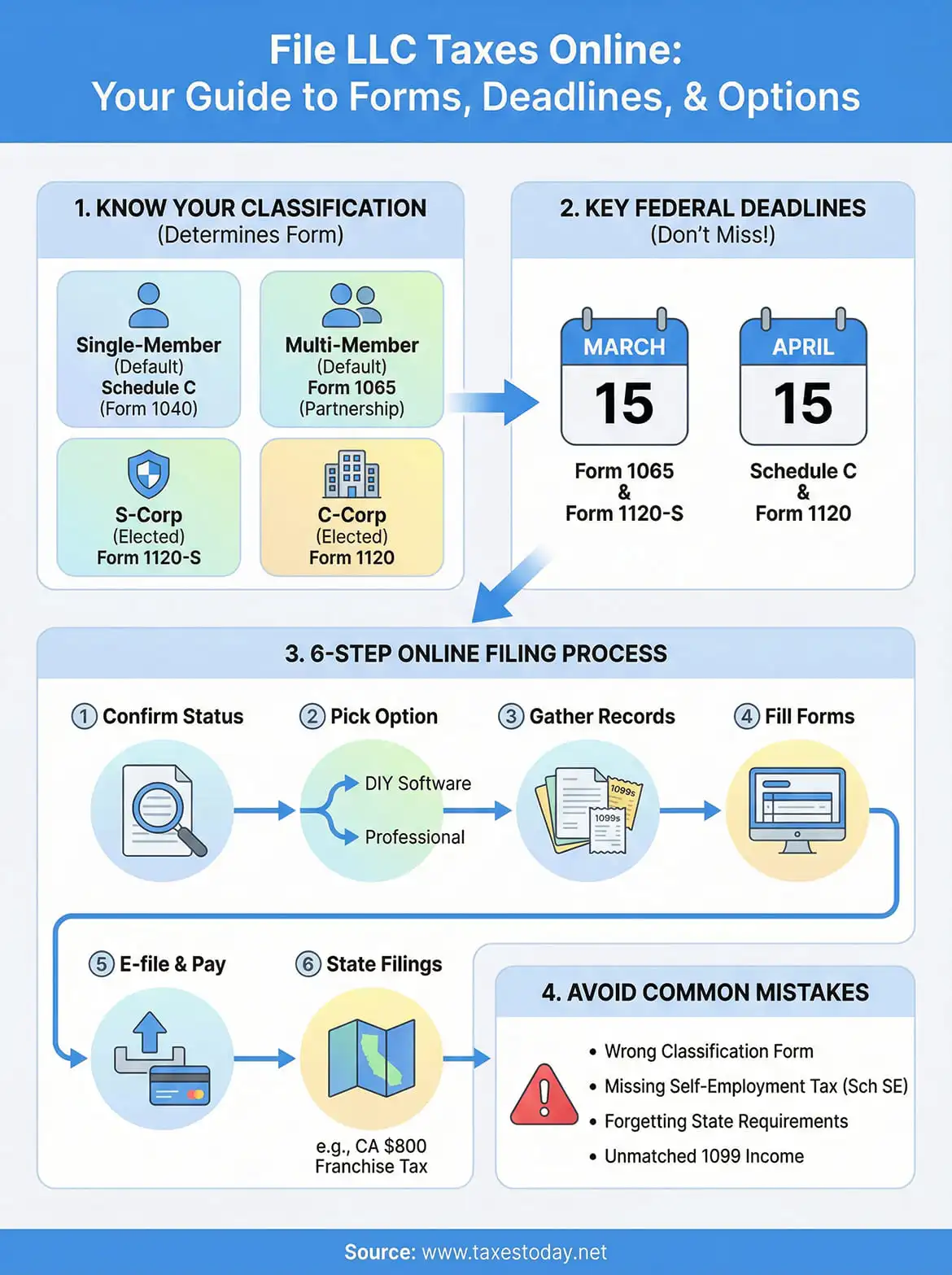
Next steps
You now have everything you need to file LLC taxes online with confidence: the correct form for your classification, your filing deadline, a working deduction checklist, and a clear picture of both federal and California state requirements. The biggest risk at this point is waiting too long to act, because rushed returns produce errors and missed deadlines produce penalties.
Start by pulling your EIN letter and last year's return today. Confirm your classification, set your deadline on your calendar, and begin gathering the income and expense records covered in Step 3. If your LLC had payroll, multiple members, an S-Corp election, or California gross income above $250,000, the complexity warrants professional help rather than a software platform.
Our team at TaxesToday handles LLC and S-Corp returns year-round, with CTEC-certified, IRS-registered preparers who know exactly what your return requires. Get your LLC taxes filed accurately and move forward without guesswork.