


5 Cheap Tax Online Filing Options in California for 2026
Filing your California return doesn't have to drain your refund before it even lands. If you're hunting for cheap tax online filing california options this season, you already know the frustration: software that quotes $25 upfront, then tacks on state filing fees, upgrade prompts, and a final bill closer to $80 or $100. That markup adds up fast if you're a freelancer, a W-2 employee with a side gig, or a small business owner trying to keep costs down.
This article answers a straightforward question: which platforms and services actually let you file both federal and state returns without hidden charges in 2026. We compare free-file programs, budget software, and low-cost professional prep so you can see what fits your income level, filing status, and how complicated your return really is.
You'll get five real options, ranging from truly free filing for simple W-2 returns to affordable flat-rate preparation for self-employed filers, LLC owners, and anyone juggling 1099s or Schedule C deductions. We've also included where hiring a licensed preparer, like our team at TaxesToday, beats DIY software once your return gets past the basics. By the end, you'll know exactly where to file, what it costs, and when paying a little more actually saves you money in missed deductions.
1. TaxesToday.net for affordable professional tax preparation
Software works fine until your return has a Schedule C, a rental property, or a 1099-NEC that doesn't match what you actually earned. That's where TaxesToday.net fits. It's a licensed tax prep service built for people who want a real preparer checking their numbers instead of a chatbot guessing at deduction categories, without paying big-firm prices for the privilege.

How it works
You choose virtual or in-person filing. Virtual clients upload W-2s, 1099s, and expense records through a secure portal, then a CTEC-certified preparer builds your return, flags missing deductions, and reviews everything with you before e-filing. In-person clients in Costa Mesa, Santa Ana, Fountain Valley, Irvine, and Newport Beach can sit down with a preparer directly. Either way, a person with 15+ years of experience is the one signing off on your return, not an algorithm.
Who it's for
This service makes the most sense for freelancers, independent contractors, single-member LLCs, and small business owners who need someone who actually understands Schedule C deductions and self-employment tax. It also covers less common situations most budget software struggles with: amended returns, back taxes, non-resident filings (1040NR), and F-1/J-1/OPT students needing Form 8843. If your return is more than a simple W-2, this is the option that catches errors before the IRS does.
A licensed preparer costs more than free software, but far less than an audit letter caused by a missed deduction.
Pricing
Flat-rate pricing starts at $99 for straightforward returns, with transparent quotes given upfront based on your filing complexity before any work begins.
| Filing situation | Typical starting price |
|---|---|
| Simple W-2, single filer | $99 |
| Self-employed / Schedule C | Custom quote |
| Amended or back tax returns | Custom quote |
| Non-resident / international filing | Custom quote |
What to watch for
Because pricing depends on complexity, self-employed and business filers should expect to pay more than the $99 entry price, so ask for a quote before committing. This isn't a free option, and it's not meant to compete with CalFile on cost. It's meant for filers who'd rather pay a fair, disclosed price than risk a DIY mistake on a complicated return.
2. CalFile for free state filing directly with the FTB
CalFornia's own Franchise Tax Board runs CalFile, a no-cost portal for filing your state return directly with the state, no third-party software fees attached. If your federal return is simple, pairing CalFile with a free federal option knocks your total filing cost down to zero.
How it works
You log into the FTB's CalFile system, enter your income and deduction details directly, and e-file your state return in one sitting. There's no software to download and no upsells waiting at checkout. You'll still need to file your federal return separately through another service, since CalFile only handles the state side.
Who it's for
CalFile suits W-2 employees with straightforward income, no rental properties, and no self-employment earnings. Renters, homeowners, and students with basic deductions generally qualify without issue.
If your California return fits on one page, CalFile is the fastest way to file it for free.
Pricing
Filing through CalFile costs nothing, regardless of your income level. There's no tiered pricing and no premium upgrade prompt hiding a better deduction finder.
What to watch for
Eligibility rules exclude several common situations: multiple state returns, certain business income types, and some itemized deductions. Check the FTB's current eligibility list before you start, because getting partway through and finding you don't qualify wastes time you don't have during filing season.
3. IRS Free File paired with FreeTaxUSA for federal and state
Pairing IRS Free File with FreeTaxUSA covers both your federal and California returns without the surprise fees that hit most commercial software once you add a state form. The IRS Free File program partners with several providers, and FreeTaxUSA is one of the few that includes free state filing for qualifying income levels.
How it works
Starting from the IRS Free File portal routes you to FreeTaxUSA's guided software, where you answer interview-style questions about income, deductions, and credits. The software builds your federal return automatically, then carries that data into your California state return. You e-file both from the same session, and confirmation comes through email once the IRS and FTB accept your forms.
Who it's for
Filers with adjusted gross income under the annual threshold set by the IRS Free File agreement qualify for the free tier. It works well for W-2 employees, students, and retirees with straightforward 1099 income.
Free File exists specifically so taxpayers below the income cap never have to pay for basic federal and state filing.
Pricing
Federal filing stays free at every qualifying income level. State filing through FreeTaxUSA is also free if you access it through the official Free File link rather than the regular site.
What to watch for
Going directly to FreeTaxUSA's main site instead of the IRS Free File link sometimes triggers state filing charges. Always start from IRS.gov to guarantee the free version applies.
4. VITA and MyFreeTaxes for free filing help
Some filers don't want software at all, they want a person to sit with them and file the return. VITA (Volunteer Income Tax Assistance) and MyFreeTaxes both fill that gap without charging a fee, making them solid options if your income qualifies and you'd rather ask questions out loud than click through a wizard.

How it works
VITA sites operate through IRS-trained volunteers at community centers, libraries, and nonprofits across California. You bring your documents, sit with a volunteer preparer, and they file your federal and state return on the spot using IRS-approved software. Find a location through the IRS VITA locator tool. MyFreeTaxes works remotely instead, pairing you with guided software or live support by phone or chat.
Who it's for
VITA generally serves filers earning $67,000 or less, along with seniors, people with disabilities, and limited English speakers. MyFreeTaxes covers similar income brackets but suits people who prefer filing from home over visiting a site in person.
Free help from a trained volunteer beats guessing your way through software you don't understand.
Pricing
Both services are entirely free, with no income-based tiers or upsells at checkout.
What to watch for
VITA sites have limited hours and fill up fast close to the deadline, and volunteers typically can't handle complex self-employment or rental income returns, so book early or look elsewhere if your situation isn't simple.
5. Budget software like OLT.com for low-cost e-filing
When your income is too high for free tiers but you still don't want to pay $80 for state filing, budget software like OLT.com fills the middle ground. These platforms strip out the hand-holding and premium add-ons that inflate prices at bigger-name competitors, leaving a bare-bones product that still e-files correctly.
How it works
Budget software runs the same way as any DIY platform: you answer income and deduction questions, the software calculates your refund or balance due, and you e-file federal and state returns from one account. OLT.com and similar low-cost providers keep interfaces simpler and skip the constant upgrade prompts that push you toward premium tiers halfway through your return.
Who it's for
This fits filers with moderate complexity returns, think multiple W-2s, some 1099 income, or itemized deductions, who don't qualify for free tiers but still want to avoid paying full price for guided software.
Budget software works fine until your return needs a human to double-check the math.
Pricing
Federal filing typically runs $10 to $20, with state filing added separately, usually under $15. Total cost rarely tops $35, far less than name-brand competitors.
What to watch for
Support is minimal, and error-checking isn't as thorough as paid preparers offer, so self-employed filers should double-check deduction categories carefully before submitting.
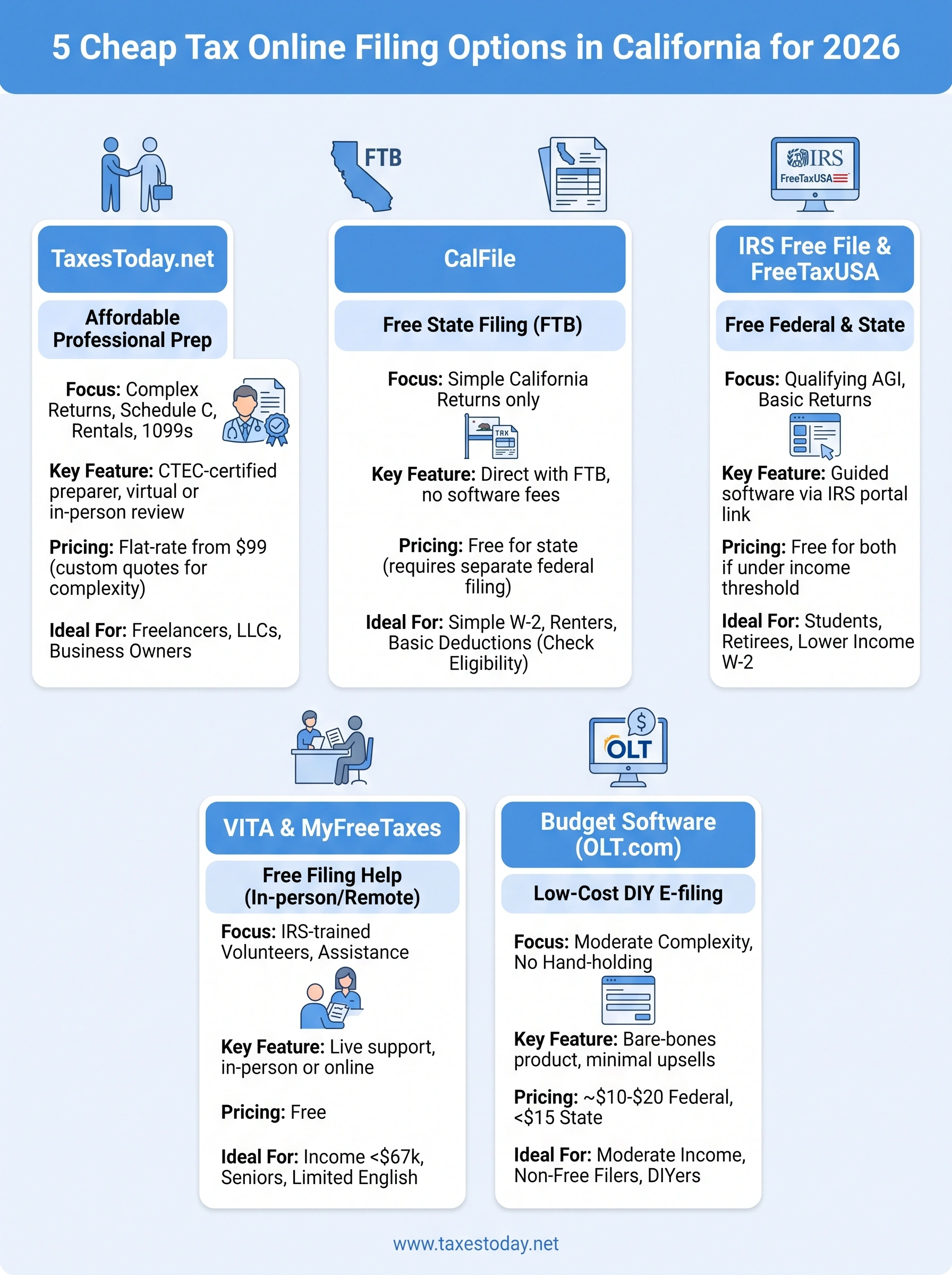
Picking the right filing option for your situation
Your income level and return complexity decide which of these five options makes sense, not brand recognition or habit. Simple W-2 returns belong in CalFile or IRS Free File paired with FreeTaxUSA, both truly free when you qualify. Moderate complexity returns fit budget software like OLT.com, where you trade support for savings. VITA and MyFreeTaxes work well if you'd rather talk through your return with a real person and your income falls under the threshold.
Once you've got a Schedule C, rental income, an amended return, or a non-resident filing situation, software starts costing you more in missed deductions than a preparer would charge. That's the point where professional review pays for itself. If your return has moved past the basics, get a transparent quote from TaxesToday and file with a licensed preparer who catches what software misses.