



File an Amended Tax Return Online: 2026 Step-by-Step Guide
You submitted your tax return and thought you were done. Then you spotted it. A missing deduction, incorrect income, or a filing status error that could cost you money or trigger an IRS notice. The good news? You can fix it, and you don't need to mail paperwork or wait weeks for the IRS to process your correction. You can file an amended tax return online using Form 1040-X.
The IRS now accepts electronic amendments through approved tax software. This means faster processing, instant confirmation, and the ability to track your amendment status online. You'll fix your mistake, potentially claim a larger refund, or correct an error before it becomes a bigger problem.
This guide walks you through the complete process of filing an amended return electronically. You'll learn when amendments are necessary, which deadlines matter, what documents you need, and how to submit everything correctly. By the end, you'll know exactly how to file Form 1040-X online and get your tax situation corrected.
When to file an amended tax return
You need to file an amended return when you discover errors or omissions on your original tax return that affect your tax liability or refund amount. The IRS requires you to correct mistakes that change how much you owe or receive. This includes reporting income you forgot, claiming deductions you missed, or fixing incorrect filing status. Filing Form 1040-X corrects these issues and brings your return into compliance with tax law.
Errors that require Form 1040-X
Tax situations that demand an amendment include mathematical errors the IRS didn't catch, unreported income from a late-arriving W-2 or 1099, or incorrect filing status that affects your tax bracket. You must file when you discover these problems after the IRS has processed your original return. Common scenarios that require amendments include:

- Missing income from a forgotten 1099 form that arrived after you filed
- Claiming the wrong filing status (single instead of head of household)
- Forgetting to report capital gains from investment sales
- Missing tax credits like the Earned Income Tax Credit or Child Tax Credit
- Incorrect dependent claims or Social Security numbers
- Unreported self-employment income or freelance earnings
- Math errors that the IRS processing system missed
- Changes to itemized deductions after finding receipts or documentation
The IRS won't automatically correct these types of errors. You need to file an amended tax return online or by mail to fix them and adjust your tax liability accordingly.
If you discover errors that would increase your refund, you have three years from the original filing deadline to claim that money.
Mistakes that don't need amendments
Not every error requires Form 1040-X. The IRS automatically corrects basic math mistakes during processing and sends you a notice explaining the adjustment. You don't need to amend when the IRS catches and fixes calculation errors, missing schedules that don't change your tax owed, or when you receive a CP2000 notice proposing changes (respond to the notice instead).
Simple situations that don't require amendments include math errors the IRS corrects, missing forms that the system requests separately, or clerical mistakes that don't affect your final tax amount. The IRS processing system handles these automatically without Form 1040-X.
However, you still need to amend if you disagree with an IRS correction or if you discover errors after receiving your refund. The key difference is whether the mistake changes your actual tax liability versus simple processing errors the IRS fixes on its own.
Watch for situations where you initially filed incorrectly but received IRS correspondence asking for clarification. Respond to those notices directly rather than filing an amendment. The IRS will tell you specifically if Form 1040-X is required. When in doubt about whether your situation needs an amendment, check your original return against current tax law and consider whether the error affects your bottom line tax amount.
Critical deadlines for tax amendments
You face strict time limits when filing an amended tax return. The IRS imposes different deadlines depending on whether you're claiming a refund, correcting an error that results in additional tax owed, or responding to an IRS notice. Missing these deadlines means losing money or facing penalties and interest. Understanding which deadline applies to your situation determines whether you can still file an amended tax return online and correct your mistakes.
Three-year deadline for refund claims
The most important deadline gives you three years from the original filing deadline to claim a refund through Form 1040-X. This means you have until April 15, 2029 to amend your 2025 tax return if you discover a missed deduction or credit that would increase your refund. The IRS will not process refund claims filed after this three-year window closes.
Calculate your deadline by starting with the original due date, not when you actually filed. If you filed your 2025 return in February 2026, you still have until April 15, 2029 to amend it. Extensions don't change this three-year period. The clock starts ticking from the unextended deadline, even if you filed on extension.
The three-year deadline is absolute. File one day late and you forfeit any refund you're owed, no matter how much money is at stake.
Two-year deadline from payment date
You can also claim a refund within two years of when you actually paid the tax, whichever gives you more time. This rule helps taxpayers who paid late or made estimated tax payments. If you paid your 2025 taxes on June 1, 2026, you have until June 1, 2028 to file an amended tax return online and claim that money back.
This deadline matters most when you made estimated tax payments or paid your tax bill months after the filing deadline. Compare both deadlines and use whichever gives you the longer timeframe to amend.
Deadline for owing additional tax
When your amendment shows you owe more tax, file Form 1040-X as soon as possible to minimize interest charges. The IRS charges interest from the original due date until you pay the additional amount. You face no specific deadline to file when you owe money, but delaying costs you more in compound interest that accumulates daily.
Pay the additional tax immediately when you file the amendment to stop interest from accruing. The IRS calculates interest based on the federal short-term rate plus three percentage points, compounded daily. Filing quickly and paying what you owe reduces your total cost.
Step 1. Collect your original tax records
You cannot file an amended tax return online without your original tax documents in front of you. Form 1040-X requires you to compare your original figures with corrected amounts, which means you need access to every form, schedule, and supporting document from your initial filing. Start by gathering your complete tax file from the year you're amending. This includes your filed Form 1040, all W-2s and 1099s, receipts for deductions, and any schedules you submitted with your original return.

Essential documents for Form 1040-X
Your amendment process starts with your original tax return copy. Pull out the exact Form 1040 you submitted to the IRS, whether you filed electronically or by mail. You need the version that shows your as-filed numbers, not a draft or worksheet. This becomes your baseline for identifying what needs correction.
Next, collect the new or corrected documents that prompted your amendment. These might include:
- A late-arriving 1099 form showing additional income
- Corrected W-2s with updated wage amounts
- Receipts or documentation for deductions you forgot to claim
- Form 1098 for mortgage interest or student loan interest
- Charitable donation records and acknowledgment letters
- Medical expense receipts if you're itemizing
- Business expense documentation for Schedule C corrections
Keep both your original documents and new documents separated into clearly labeled folders. This prevents confusion when you enter information on Form 1040-X.
Calculating the changes
Compare your original return against the correct information to determine exact dollar amounts that changed. Form 1040-X has three columns: Column A shows your original figures, Column B shows the net change (increase or decrease), and Column C shows the correct amounts. Work through each line that needs adjustment and calculate the precise difference between what you reported and what you should have reported.
Write down these changes on a worksheet before you file an amended tax return online. For example, if your original return showed $45,000 in wages but a corrected W-2 shows $47,500, your Column A entry is $45,000, your Column B entry is +$2,500, and your Column C entry is $47,500. Calculate how these changes affect your adjusted gross income, taxable income, and final tax liability.
Double-check your math on every affected line. Errors on Form 1040-X create processing delays and may trigger IRS correspondence requesting clarification. Verify that your corrected amounts match your supporting documentation exactly before moving to the next step.
Step 2. Select your online tax service
You need IRS-approved tax software to file an amended tax return online electronically. Not every tax preparation platform supports Form 1040-X e-filing, so verify that your chosen service explicitly offers electronic amendment filing. The IRS maintains a list of approved software providers that can transmit Form 1040-X directly to their systems. Major platforms like TurboTax, H&R Block, and TaxAct all support electronic amendments for tax years 2019 and later, but you must check whether your specific tax year qualifies for online filing.
IRS-approved software options
Choose software that handled your original tax return if possible. Using the same platform simplifies the amendment process because the software already has your original data stored. You can import your previous return directly, which reduces data entry errors and speeds up the comparison between your original and corrected figures. The software automatically populates Column A on Form 1040-X with your as-filed information.
If you used a different service for your original return or filed on paper, you'll need to manually enter all original data before making corrections. Most tax software requires you to recreate your entire original return first, then apply the changes. This takes longer but still allows you to file an amended tax return online and track your submission electronically.
Free File options typically don't support amended returns, so expect to pay a fee for Form 1040-X preparation and e-filing.
Key features to look for
Your chosen software must support e-filing for Form 1040-X in your specific tax year. Check the software's capabilities page or contact their support team to confirm they can electronically submit amendments for the year you're correcting. Some platforms only support paper filing for older tax years, which defeats the purpose of filing online.
Look for these essential features:
- Automatic calculation of changes between Column A, B, and C
- Import capability from your original return
- Error checking that flags common amendment mistakes
- Electronic signature options to avoid printing and mailing
- Direct tracking integration with IRS Where's My Amended Return tool
- State amendment preparation if you need to correct both returns
- Customer support specifically for Form 1040-X questions
Pay attention to pricing transparency. Some software advertises free filing but charges separately for amendments. Fees typically range from $40 to $90 for federal Form 1040-X preparation, with additional charges for state amendments. Compare pricing across platforms before committing to one service.
Step 3. Enter corrections on Form 1040-X
Your tax software guides you through Form 1040-X's unique three-column layout that shows your original figures, the changes you're making, and the corrected amounts. The software automatically pulls data from your original return into Column A if you imported it, so you focus on entering the corrections in the middle section. This step requires careful attention because every change you make flows through the form and recalculates your final tax liability or refund amount.
Understanding the three-column format
Form 1040-X divides each line into three columns that work together to show the IRS exactly what changed. Column A displays the amounts from your original return as filed. Column B shows the net increase or decrease (the difference between original and corrected). Column C shows the correct amounts you should have reported. Your tax software automatically calculates Column B and Column C once you enter the corrected information, but you must verify these calculations match your supporting documents.

Enter your corrections by updating the specific lines that contain errors. For example, if you forgot to report $3,000 in freelance income on Line 1 (wages), your software shows your original wages in Column A, adds the $3,000 adjustment in Column B, and displays the new total in Column C. The change flows through to your adjusted gross income, taxable income, and final tax calculation.
Common lines requiring corrections
Focus on the lines where your original return contained errors or omissions. The most frequently amended lines include Line 1 for wages and income corrections, Line 8 for additional income like 1099 earnings, and the standard or itemized deduction lines when you switch between deduction methods. Tax software highlights these common correction areas and walks you through each change.
Typical corrections you might enter include:
- Adding missing 1099 income to Line 8
- Claiming forgotten tax credits on Schedule 3
- Correcting filing status that affects your entire tax calculation
- Adding or removing dependents and their qualifying credits
- Adjusting retirement contributions or HSA deductions
- Fixing capital gains reporting from investment sales
Explaining your changes in Part III
Part III of Form 1040-X requires you to explain every correction you're making in plain language. Your tax software provides a text box where you describe what changed and why you're filing the amendment. Write clear, specific explanations that reference the documents supporting your corrections. The IRS uses this explanation to process your amendment faster and determine whether they need additional documentation.
Keep your explanation concise but complete. State exactly what was wrong on the original return and what you're correcting it to, along with the reason for the change.
Write something like "Adding $5,200 in 1099-NEC income from ABC Company that was not reported on original return" or "Claiming missed Child Tax Credit for dependent Jane Doe, SSN 123-45-6789." Your explanation should match the documentation you have on file in case the IRS requests verification during processing.
Step 4. Submit your amended return online
Your tax software walks you through the final submission process once you've completed all corrections on Form 1040-X. The electronic filing process differs from your original return because amended returns require additional verification steps before the IRS accepts them. You must review every change, sign the form electronically, and receive confirmation that your amendment transmitted successfully. This step finalizes your corrections and starts the IRS processing timeline for your amended return.
Review your completed Form 1040-X
Check every line of your completed Form 1040-X before you file an amended tax return online to catch errors that could delay processing. Your software displays a summary screen showing all changes between your original and corrected returns, including how the corrections affect your final tax liability or refund. Verify that Column A matches your original return exactly, Column B shows the correct adjustments, and Column C displays your corrected totals.
Pay attention to these critical review points before submitting:
- Part III explanation clearly describes each change you made
- Supporting documents are attached if required by your software
- Math calculations flow correctly through the entire form
- Social Security numbers for you, your spouse, and dependents are accurate
- Bank account information is correct if you expect a refund via direct deposit
- Address information matches your current mailing address for IRS correspondence
Print a copy of your completed Form 1040-X for your records before submitting. Your software provides a PDF version that shows exactly what the IRS will receive, including all schedules and attachments.
Electronic signature and transmission
Sign your Form 1040-X electronically using the same method you used for your original return. Most tax software requires you to enter your prior-year AGI (adjusted gross income) or your self-selected PIN to authenticate your identity. If you're married filing jointly, both spouses must sign the amendment electronically, even if only one person is making the changes.
Your electronic signature legally binds you to the accuracy of all information on the amended return, just like signing a paper form.
Click the final submit button after signing to transmit your Form 1040-X directly to the IRS. The software connects to IRS servers and uploads your complete amendment package within seconds. You receive an immediate acknowledgment screen showing your submission timestamp and a confirmation number. Save this confirmation number in your tax files as proof that you filed your amendment electronically and on what date.
Step 5. Track your status with the IRS
You can monitor your amended return's progress using the IRS Where's My Amended Return (WMAR) tool after the agency accepts your electronic submission. The IRS updates this online tracking system once per day, and your amendment typically appears in the system within three weeks after you file an amended tax return online. Access the tool directly at IRS.gov without creating an account or logging in, which gives you instant status updates on your Form 1040-X processing timeline.

Accessing the tracking tool
Navigate to the IRS Where's My Amended Return page and enter three pieces of information to check your status. You need your Social Security number (or ITIN), your date of birth, and the ZIP code from your amended return. The system immediately displays your amendment's current status and provides an estimated completion date based on the IRS's current processing times.
Check your status using these steps:
- Visit the IRS Where's My Amended Return tool online
- Enter your Social Security number exactly as it appears on Form 1040-X
- Input your date of birth in the MM/DD/YYYY format
- Type the ZIP code from your amended return's mailing address
- Click "Submit" to view your current processing status
The tool shows information for the current tax year plus up to three prior years, so you can track multiple amendments if you filed corrections for different tax years.
The IRS processes electronically filed amendments faster than paper returns, typically within 16 weeks compared to 20 weeks or more for mailed forms.
Understanding status updates
Your amendment moves through three distinct phases in the WMAR system, and the tool clearly identifies which stage your return has reached. The first status shows "Received" when the IRS accepts your electronic submission and enters it into their processing queue. This appears within three weeks of filing and confirms the agency has your Form 1040-X.
Status changes to "Adjusted" once an IRS examiner reviews your changes and processes the corrections you made. This middle stage means the IRS is actively working on your amendment and verifying your supporting documentation. The system displays specific information about what adjustments the IRS made during review.
Final status reads "Completed" after the IRS finishes processing your entire amendment. This means they either approved your changes, sent you a refund check, or applied additional tax you owed to your account. The completed status includes the date the IRS finished processing and explains what action they took on your amended return. You receive a separate notice by mail explaining the specific outcome of your amendment within one to two weeks after completion.
Handling refunds or additional payments
Your amended return creates one of two outcomes after you file an amended tax return online: either the IRS owes you money, or you owe the IRS additional tax. The Where's My Amended Return tool tells you which scenario applies once processing completes, but you can predict the outcome by looking at Line 20 on Form 1040-X before submitting. A positive number means you receive a refund, while a negative number means you owe the IRS money. Understanding how to handle each situation prevents confusion and helps you take the right financial steps after filing.
If you're owed a refund
The IRS sends refund checks from amended returns separately from your original refund, typically within two to three weeks after they mark your amendment as completed in the tracking system. You receive the money through direct deposit if you provided bank account information on Form 1040-X, or the IRS mails a paper check to your address on file. The refund amount matches the difference between your original tax liability and your corrected tax liability after all changes.
Track your refund's arrival using the exact completion date shown in the Where's My Amended Return tool. Direct deposits usually arrive faster than checks, often within 7 to 10 business days after the completed status appears. Paper checks take longer because they go through the mail system and can experience delays. The IRS does not pay interest on refunds from amended returns unless they take longer than 120 days to process your Form 1040-X after you filed it.
You cannot expedite a refund from an amended return, so plan your finances accordingly rather than expecting immediate payment.
If you owe additional tax
Pay the additional tax amount immediately when you submit your Form 1040-X to stop interest charges from accumulating. The IRS calculates interest from the original due date of your return through the date you pay in full, which means you're already behind even before filing the amendment. Send payment through IRS Direct Pay, mail a check with Form 1040-V (payment voucher), or use the Electronic Federal Tax Payment System (EFTPS) for the fastest processing.
Calculate your payment by looking at Line 20 on your completed Form 1040-X, which shows the total tax you owe from all corrections. Include this exact amount with your amendment submission to avoid additional interest and potential underpayment penalties. The IRS charges interest at the federal short-term rate plus three percentage points, compounded daily on unpaid balances. Paying late costs you more money every single day the balance remains unpaid.
Don't forget to amend your state return
Your federal Form 1040-X does not automatically update your state tax return, even when you file an amended tax return online through IRS-approved software. Each state operates its own tax system with separate forms, deadlines, and amendment requirements. You must file a state-amended return separately if your corrections affect income, deductions, or credits that you also reported on your state return. Failing to amend your state return when required can result in incorrect tax liability, missed refunds, or future compliance issues with your state tax agency.
Determining if you need a state amendment
Check your state's specific rules to determine whether you must file an amended state return after correcting your federal taxes. Most states require amendments when federal changes affect your state taxable income or tax owed. For example, if you added $5,000 in 1099 income to your federal Form 1040-X, that same income likely needs reporting on your state amendment because most states use your federal adjusted gross income as the starting point for state tax calculations.
States with no income tax (Alaska, Florida, Nevada, New Hampshire, South Dakota, Tennessee, Texas, Washington, and Wyoming) don't require amendments because you never filed a state return initially. Some states automatically accept federal changes without requiring separate amendment filings, but most states need you to submit their state-specific amendment form to process corrections.
Your state may impose penalties if you fail to amend when federal changes increase your state tax liability, so file both returns when corrections affect state taxes.
Filing your state amendment
Use your state's designated amendment form rather than filing a new original return with "amended" written across the top. Each state publishes its own version of an amended return form, typically named similar to "Form 540-X" or "Schedule X." Download the correct form from your state tax agency's website or access it through your tax software if the platform supports state amendments for your specific state.
Follow these steps to complete your state amendment:
- Obtain the correct amendment form for your state and tax year
- Enter your original state figures in the designated columns
- Input your corrected amounts based on your federal Form 1040-X changes
- Explain the reason for your amendment in the required explanation section
- Attach copies of your federal Form 1040-X and supporting documentation
- Submit by mail or electronically if your state accepts e-filed amendments
Mail your state amendment to the address listed in your state's instructions, which often differs from where you sent your original return. Processing times vary by state but typically take 8 to 12 weeks for mailed forms. States that accept electronic amendments process them faster, similar to federal e-filing timelines.
Conclusion
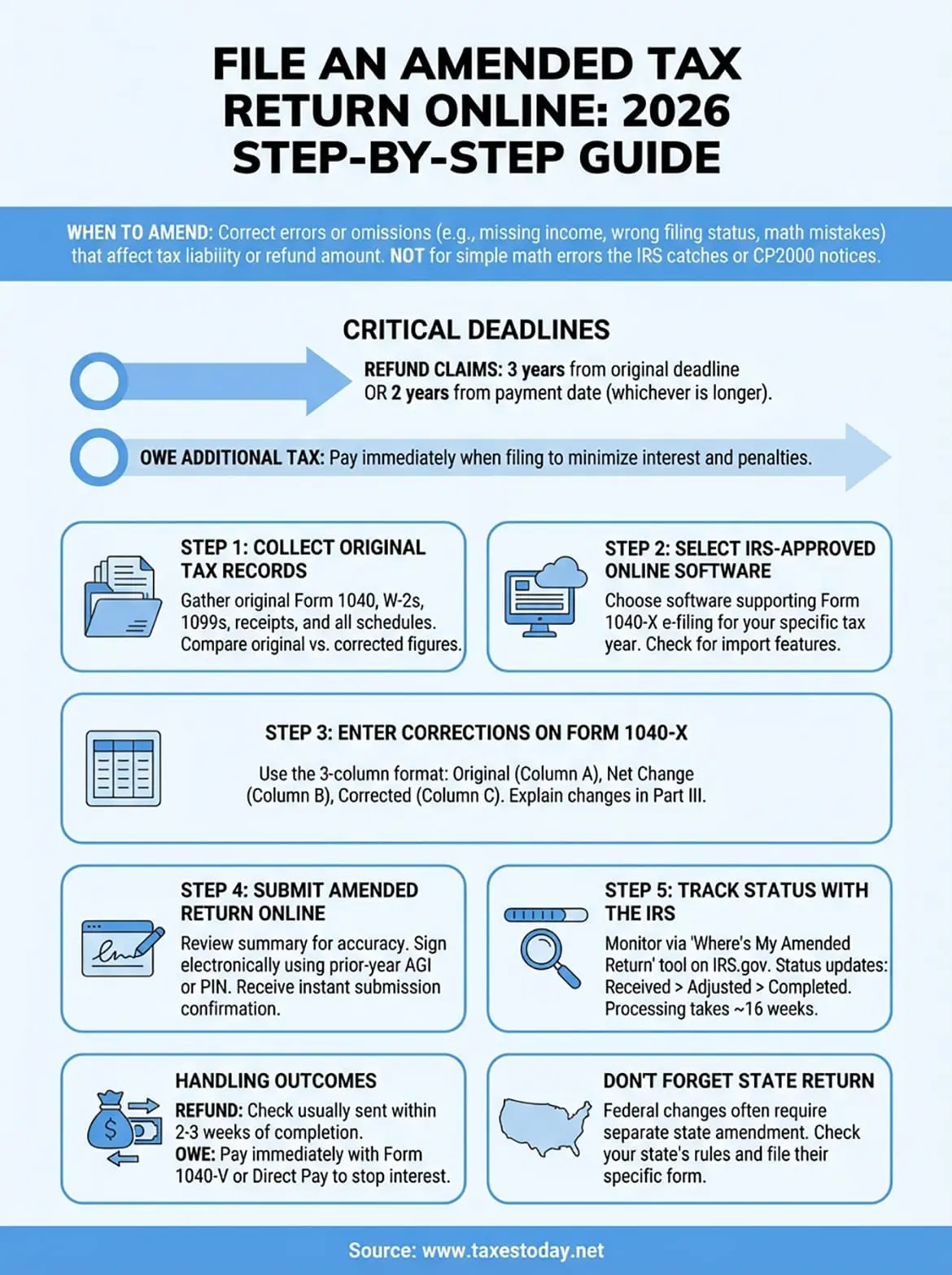
You can now file an amended tax return online through IRS-approved software and fix errors on your original return without mailing paperwork. This guide showed you the complete process from gathering documents to tracking your amendment status electronically. Electronic filing gives you instant confirmation, faster processing times, and the ability to monitor your Form 1040-X through the IRS tracking system. You learned when amendments are necessary, which deadlines matter, and how to submit corrections that could increase your refund or fix compliance issues.
Filing Form 1040-X yourself works well for straightforward corrections, but complex amendments involving multiple income sources, business deductions, or international tax issues benefit from professional review. Tax professionals catch errors before you submit and ensure your corrections comply with current tax law. Professional tax preparation services handle amended returns along with your original filing, giving you peace of mind that both returns are accurate and complete.